



Ever feel like your support team is just a group of highly skilled firefighters, sprinting from one “emergency” ticket to the next?
I’ve spent years in marketing, constantly talking to support teams and customers, and I keep seeing the same pattern: the same how-to questions, the same tickets, the same “just checking in” follow-ups that shouldn’t even land in the customer support inbox. It slows your team down and frustrates customers who just want quick, clear answers to their problems.
From where I sit, the fix isn’t hiring more reps. It’s building systems that let customers solve things on their own and provide support 24/7. That’s why I believe investing in the best customer self-service software is one of the smartest ways to scale support without stretching your budget or burning out your team.
So I compared 20+ platforms, dug into G2 user reviews and feature data, and narrowed it down to the 7 best customer self-service software options for 2026: Salesforce Service Cloud, Zendesk, Zoho Desk, HubSpot Service Hub, Freshdesk, Fin by Intercom, and UserGuiding.
In this article, I break down what each tool does best, where it falls short, and who it’s actually right for — so you can reduce ticket volume, empower customers to find answers independently, and scale support without scaling headcount.
7 best customer self-service software for 2026
- Salesforce Service Cloud: Best for enterprises
configurable, CRM-connected self-service portal with Agentforce and embedded workflows ($25/users/mo) - Zoho Desk: Best for budget-friendly small businesses
multilingual help center, community forums, and guided conversations ($7/user/mo) - Zendesk for Customer Service: Best for AI-powered support
scalable help center with strong automation and bot-driven deflection ($19/agent/mo) - HubSpot Service Hub: Best for an all-in-one, user-friendly platform
CRM-connected portal with proactive assistance and natural language support ($45/mo) - Freshdesk: Best for easy-to-deploy self-service
intuitive knowledge base and automation designed for ticket deflection ($19/mo) - Fin by Intercom: Best for conversational AI self-service
An AI agent that resolves queries directly from your knowledge base ($0.99/resolution) - UserGuiding: Best for in-app self-service
in-app resource center with walkthroughs, tooltips, and onboarding checklists ($174/mo)
*These customer self-service software are top-rated in their category, according to the G2’s Winter 2026 Grid® Report for customer self-service software. I’ve also added their starting price for the monthly plans to make comparisons easier for you.
What makes the best customer self-service software?
At its core, a customer self-service software is a category of tools that enables customers to find answers, resolve issues, or complete support-related tasks on their own, without needing to interact directly with a support agent. It can be knowledge bases, a chatbot, a community forum, guided workflows, or in-app resources.
From what I’ve learned talking to CX leaders and support teams, the best customer self-service software doesn’t just “offer self-service.” It actively reduces repetitive tickets, shortens resolution time, and gives customers clear, contextual answers before they ever hit submit on a support form. It’s structured, searchable, integrated with your help desk, and actually easy for customers to use
The data backs that up. On G2, customer self-service software sees an average user adoption rate of 67%, reaches time to ROI in about 11 months, and 91% of users say it meets their requirements.
To me, that’s what “best” really means: software your customers actually use, your team sees value from within a year, and your support operation can confidently scale around.
Confused between self-service and help desk? Read this G2 guide on self-service and help desk to know which one you need.
How did I find and evaluate these customer self-service software?
To start, I turned to G2’s customer self-service software category page, grid reports, and product reviews to create an initial list of contenders.
From there, I used AI-assisted analysis to comb through thousands of verified G2 reviews, looking specifically for feedback around ticket deflection, knowledge base usability, AI chat effectiveness, onboarding friction, integrations, and measurable support impact.
Since I couldn’t personally test these tools, I consulted a professional with hands-on experience and validated their insights using verified G2 reviews. The screenshots featured in this article may be a mix of those obtained from the vendor’s G2 page or from publicly available materials.
My criteria for selecting the best customer self-service software
When narrowing down the best customer self-service software, I focused on what CX leaders and support teams consistently say drives real ticket reduction and long-term impact. My goal was to prioritize tools that support scalable operations, measurable ROI, and a smoother customer experience.
Here’s what mattered most in my evaluation:
- Knowledge base usability and search experience: In nearly every conversation I’ve had with support teams, discoverability comes up first. If customers can’t quickly find accurate answers, self-service adoption drops. I looked for structured content, smart search, tagging, and intuitive navigation.
- AI chat and automated resolution capabilities: Repetitive “how-to” questions are a major drain on support bandwidth. I evaluated how effectively each platform uses conversational AI chatbots to surface relevant answers, guide customers in context, and handle high-volume queries without human intervention.
- Ticket deflection tracking and analytics: CX leaders need proof that self-service is working. I prioritized platforms that provide clear reporting on article views, successful resolutions, deflection rates, and performance trends so teams can quantify impact.
- Ease of content creation and maintenance: Outdated help centers create confusion and extra tickets. I looked at how easily teams can update articles, manage versions, assign ownership, and keep documentation aligned with product changes.
- Integrations with help desk and CRM systems: Self-service works best when it’s embedded into the broader support ecosystem. I gave preference to tools that connect seamlessly with help desks, CRM platforms, live chat, and automation workflows.
- In-app guidance and contextual support: For SaaS teams especially, in-product walkthroughs and contextual prompts reduce onboarding friction. I included tools that support guided experiences inside the product environment.
- Customization and branding control: A help center is often a customer’s first stop during friction. I considered how much flexibility teams have over design, navigation, localization, and overall experience consistency.
- User adoption and satisfaction (G2 Data): Finally, I looked at G2 data to validate performance. High adoption rates, strong satisfaction scores, and consistent feedback around usability and value were strong indicators of durable impact.
These criteria helped me filter out tools that look good on paper and focus on platforms that support teams can realistically scale with.
The list below contains genuine user reviews from our Customer Self-service Software category page. To qualify for inclusion in the category, a product must:
- Provide information to customers without human interaction
- Assist end users in completing common tasks
- Provide 24-hour support to customers seeking assistance
- Organize and distribute information for commonly asked questions
* This data was pulled from G2 in 2026. The product list is ranked alphabetically. Some reviews may have been edited for clarity.
If you’re looking for agentic AI to take over your customer support workflows, explore top-rated AI agents on G2 and compare verified reviews to find the right fit.
1. Salesforce Service Cloud: Best for enterprises
If you work anywhere near sales, support, or RevOps, Salesforce is probably already part of your vocabulary. It’s one of those platforms that feels almost default in CRM and customer service conversations. If you already run on Salesforce, using the Service Cloud for customer self-service is a no-brainer.
Service Cloud holds a 4.4 out of 5 rating across 7,195+ reviews, with usage split across 18% small businesses, 41% mid-market, and 41% enterprise. That distribution tells me this isn’t just an enterprise heavyweight—it’s being used (and validated) across different growth stages.
From my research, Salesforce Service Cloud offers a fully branded, authenticated self-service portal that connects directly to your CRM data, case management, and knowledge base. Customers can log in, search for answers, and complete real actions, like submitting requests or updating information, without creating a ticket.
What stood out to me is how configurable the experience is. Teams can use low-code tools like Experience Builder to launch and customize their help center, embed workflows into the portal, and personalize content through Agentforce based on customer history and activity.
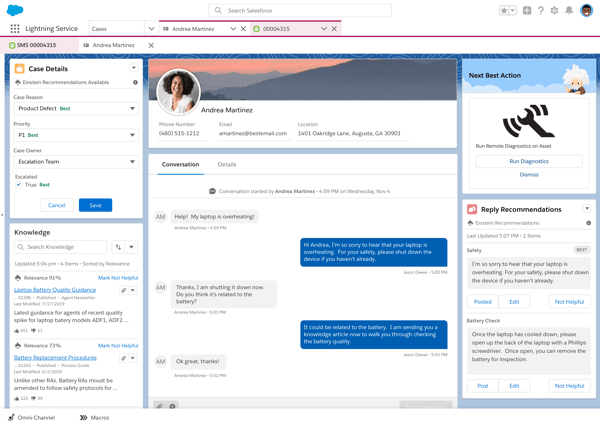
It also layers in AI-driven search, article summaries, conversational Q&A, and proactive alerts powered by Data 360 signals. The result, at least on paper and in user feedback, is a self-service experience that feels contextual and connected rather than static.
According to the G2 Data I saw, automation (88%), integrations (87%), and knowledge base (87%) stand out as the highest-rated features. That tracks with what I’d expect from Salesforce. The automation capabilities are deeply embedded into case routing, workflows, and escalations, which makes it easier to systematically reduce repetitive tickets. The knowledge base isn’t floating separately either; it connects directly to cases, so resolved issues can quickly become searchable resources. Over time, that tight loop between support and documentation can seriously improve deflection rates.
For complex support environments, that kind of validation matters more than flashy features. Industry representation also leans heavily toward Information Technology and Services, Computer Software, Financial Services, healthcare, and manufacturing industries, where workflows, compliance, and case complexity are important.
That said, Service Cloud is undeniably powerful, but it tends to deliver the strongest results for teams that approach it with intention. Based on review trends I’ve seen, teams that invest in a structured rollout plan and dedicate time to onboarding, configuration, and user training are the ones that unlock its full potential. That upfront effort often translates into long-term scalability, customization, and deeper value realization.
Also, a few G2 reviewers note that Salesforce’s pricing scales with added functionality and additional licenses, reflecting the platform’s modular, enterprise-focused structure. As teams expand usage or layer on advanced capabilities, overall investment increases accordingly. This model is often well-suited for growing or enterprise support teams, while smaller teams may evaluate how the pricing structure aligns with their current scope and long-term plans.
Where I see Service Cloud delivering the most value is for mid-market and enterprise teams or growing companies already invested in Salesforce that want self-service to be fully embedded into their customer experience strategy.
If you’re handling high ticket volumes, managing complex workflows, or aiming to proactively resolve issues before they escalate, this platform gives you the infrastructure to do it.
What I like about Salesforce Service Cloud:
- Salesforce is deeply connected. Automation, integrations, and the knowledge base consistently show up as strengths in G2 reviews, and it’s clear teams value having CRM data, case management, and self-service living in one ecosystem.
- I also appreciate how configurable the self-service experience is. From branded portals to embedded workflows and AI-powered knowledge features, it gives growing mid-market and enterprise teams room to scale without switching platforms later.
What G2 users like about Salesforce Service Cloud:
“I love how easy the setup process of Salesforce Service Cloud is, allowing a complete implementation in just twelve weeks. I find the knowledge aspects and self-service tools like Einstein Chatbots and AgentForce invaluable, significantly reducing the workload by enabling customers to self-serve. The Service Cloud’s efficiency in reducing our employees’ overall case handling time delivers exceptional value, making it worth purchasing again.”
– Salesforce Service Cloud review, Joseph K.
What I dislike about Salesforce Service Cloud:
- Teams wanting a quick-launch, low-configuration solution may need to plan for implementation time and internal ownership. Based on G2 feedback, the platform delivers strong value, but it works best when someone is actively managing and optimizing it.
- According to G2 reviews, while many users report strong value from the platform’s breadth, smaller teams may want to assess how the overall investment aligns with their current scope and long-term plans.
What G2 users dislike about Salesforce Service Cloud:
“I find that implementing Salesforce Service Cloud out of the box could be easier. Even though setting it up isn’t difficult, enhancing the simplicity of implementation would be beneficial.”
– Salesforce Service Cloud review, Alejandra G.
2. Zoho Desk: Best for budget-friendly small businesses
G2 rating: 4.4/5⭐
If Salesforce often feels like the enterprise heavyweight in customer service, Zoho Desk strikes me as the practical choice that small businesses actually grow with. It’s positioned at a more accessible price point, widely adopted by SMBs, and built in a way that doesn’t assume you have a full admin team behind the scenes.
That positioning shows up clearly in the data. 74% of Zoho Desk’s reviews come from small businesses, with 21% mid-market and just 4% enterprise. To me, that’s a strong signal: this is a platform that’s resonating most with lean support teams who need structure and automation without unnecessary complexity.
Reviewers often mention how quickly they can launch a branded help center using built-in customization tools, create web forms, configure ticket layouts, and enable live chat. The ASAP help widget brings the help center, chatbot, and live agent support into one embedded experience, which keeps self-service and assisted support connected.
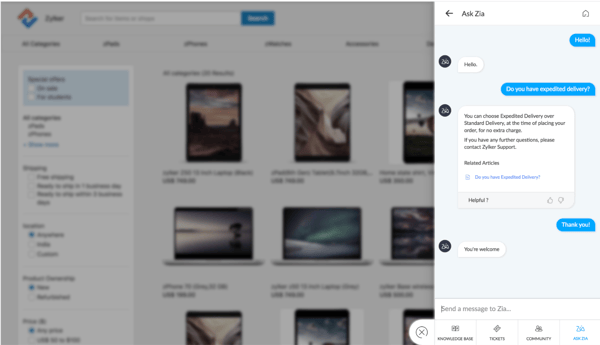
Teams can enable customers to participate in community forums, follow guided conversations for repetitive or process-heavy questions, or raise and track tickets directly within the portal.
Zoho also layers in AI through Zia, which helps generate contextual responses and supports guided chat flows. Combined with multilingual support in over 50 languages and multi-brand capabilities, it gives growing companies flexibility as they expand into new markets or manage multiple product lines.
This aligns with what I see on G2 Data. Zoho Desk scores particularly well on knowledge base (87%), searchable articles (86%), and branding (86%).
Users frequently highlight how straightforward it is to publish and manage articles, track engagement, and keep content updated.
The Grid Report shows strong representation in IT services, computer software, security, financial services, and retail industries, where digital-first support is table stakes
That said, from what I’ve gathered in G2 feedback, teams wanting a very intuitive, plug-and-play experience may need to plan for a bit of onboarding time. While Zoho Desk is generally considered easy to use, some users mention that understanding automation rules, advanced settings, or workflow configurations can take a little ramp-up, especially if you’re setting up more structured processes.
I’ve also seen feedback around reporting flexibility. Teams that rely heavily on highly customized, granular analytics might want to evaluate reporting capabilities early on. While Zoho Desk provides solid out-of-the-box dashboards and metrics, organizations with very specific reporting frameworks may need to explore configuration options or supplemental tools to get exactly what they need. This keeps everyday reporting straightforward while allowing advanced users to extend further.
Ultimately, I’d recommend Zoho Desk for any growing team that wants to stop being reactive and start being proactive. It is particularly valuable for small-to-mid-sized businesses that need a robust, all-in-one self-service portal to deflect tickets and empower their customers. If you’re looking for a platform that balances powerful automation with a genuinely user-friendly experience and budget-friendly, Zoho Desk is easily one of the best investments you can make for your support team.
What I liked about Zoho Desk:
- I like how approachable and practical it feels for small teams. G2 reviewers consistently highlight ease of use, setup, and admin, and that shows in the adoption mix. SMBs clearly find it manageable without heavy technical overhead.
- I also appreciate the strength of its knowledge base and self-service capabilities. Users frequently mention how easy it is to organize articles, enable community forums, and guide customers through structured chat flows, which makes it a strong fit for reducing repetitive tickets.
What G2 users like about Zoho Desk:
“What I like best about Zoho Desk is its user-friendly interface and strong automation capabilities. It makes ticket management easy with powerful workflows, SLA tracking, and multi-channel support (email, chat, phone, and social). The knowledge base and self-service features are well-designed, and the integration with other Zoho products helps keep customer support operations efficient and centralized.”
– Zoho Desk review, Suresh Chand M.
What I dislike about Zoho Desk:
- Teams wanting highly advanced workflow configurations from day one might plan for some onboarding time. Based on review feedback, unlocking deeper automation features can require a bit of setup and familiarity with the system.
- Teams that rely on deeply customized or highly granular reporting frameworks may want to review dashboard flexibility early. While out-of-the-box reports cover most needs, more tailored analytics may require additional configuration.
What G2 users dislike about Zoho Desk:
“That said, there are a few areas that could be improved. Advanced features like complex workflows have a learning curve, and some customization options are locked behind higher-tier plans, which can feel limiting for smaller teams. Reporting is good, but it can feel rigid if you need highly tailored dashboards. The mobile app works well for basic ticket handling but lacks some advanced functionality.”
– Zoho Desk review, Jason M.
3. Zendesk for Customer Service: Best for AI-powered support
G2 rating: 4.4/5⭐
If you’ve spent any time in the customer support software space, Zendesk is probably one of the first names that comes up. To me, it’s one of those platforms that feels almost synonymous with modern help desks.
On G2, Zendesk carries a 4.3 out of 5 rating across 5,800+ reviews, with adoption spread across 40% small businesses, 47% mid-market, and 14% enterprise. It’s flexible enough for growing teams but structured enough for larger operations.
From the G2 Grid Report, features like knowledge base, multi-channel support, and integrations consistently rank highly. That aligns with what I’ve seen in user feedback. Zendesk’s help center is tightly woven into the ticketing system, making it easy to convert solved issues into searchable articles.
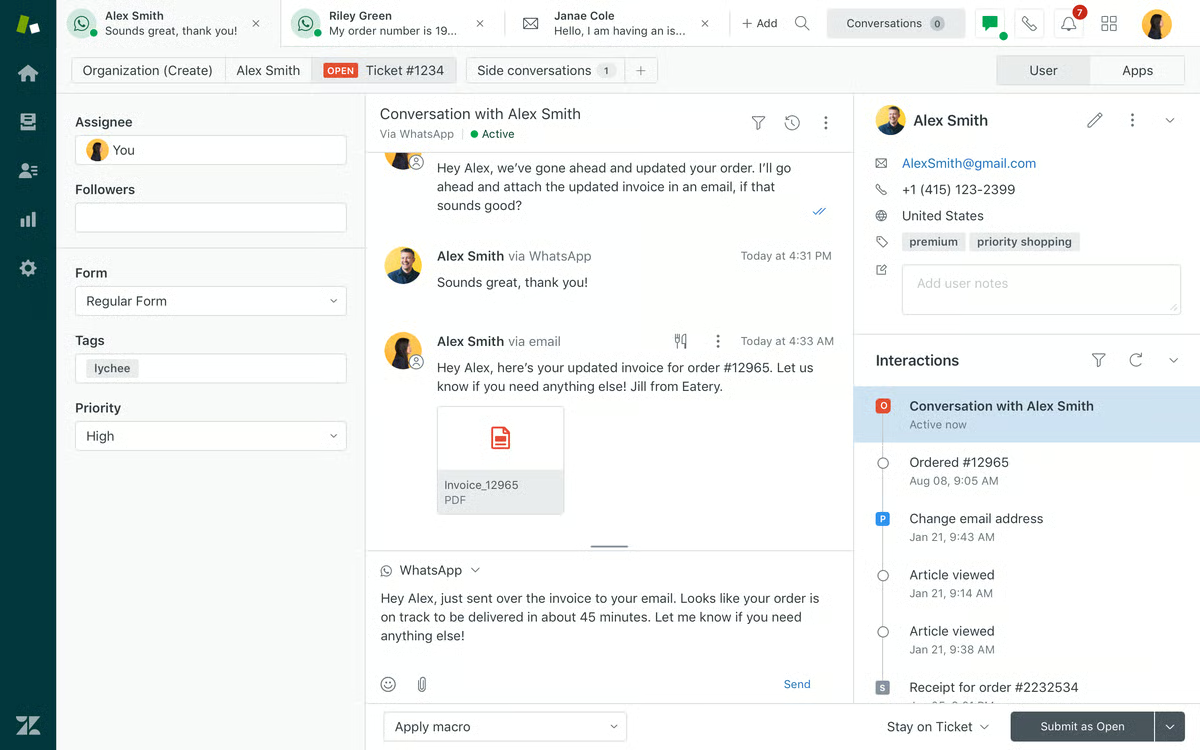
The customer portal allows users to submit and track tickets, browse knowledge articles, and engage with community discussions in one unified space. I also like how customizable the portal is. You can brand it, structure categories clearly, and surface relevant content based on context.
Ease metrics further reinforce its accessibility. Ease of use and ease of setup score well relative to other enterprise-grade platforms, which explains why so many mid-market teams gravitate toward it. In my research, users frequently mention that agents can get up and running quickly, and admins can configure workflows without excessive technical lift.
Zendesk’s AI and automation capabilities are a big part of its self-service strength. Its bots can deflect repetitive tickets, suggest articles in real time, and guide customers through structured conversations.
I see Zendesk used across companies in information technology, software, retail, financial services, and the healthcare industry, according to G2 Data. That diversity suggests it adapts well across different service models, whether you’re supporting B2B SaaS customers or high-volume consumer interactions.
That said, some G2 reviewers note that teams wanting very advanced customization across every layer of the system might plan for some configuration time. Zendesk is powerful, but unlocking its full flexibility, especially for complex workflows or multi-brand environments, often requires thoughtful setup and ongoing optimization.
I’ve also noticed feedback around cost predictability as teams scale. Organizations planning rapid growth or adding advanced features may want to map out long-term usage carefully. Zendesk offers robust capabilities, and as you layer in automation, AI, and additional modules, it’s worth aligning those investments with your broader CX strategy.
Overall, I see Zendesk for Customer Service as one of the best customer self-service software options for growing and mid-market teams that want a mature, widely adopted platform with strong automation and a polished customer portal.
What I like about Zendesk for Customer Service:
- Users consistently praise its knowledge base and multi-channel support. G2 reviewers often highlight how seamlessly the help center connects with ticketing, chat, and automation, which makes self-service feel integrated rather than siloed.
- Users also appreciate its balance of usability and depth. With strong ease-of-use and ease-of-setup scores on G2, many teams mention they can get agents productive quickly while still having access to advanced workflows, triggers, and AI-powered bots as they scale.
What I like about Zendesk for Customer Service:
“The ability to customize workflows and dashboards according to business needs is one of its greatest strengths. The integrated knowledge base also helps drastically reduce tickets thanks to self-service. It is a platform designed to scale robustly without sacrificing the quality of the customer experience.”
– Zendesk for Customer Service review, Giuseppe P.
What I dislike about Zendesk for Customer Service:
- Teams wanting highly tailored workflows or multi-brand configurations might plan for thoughtful setup and ongoing optimization. Based on user feedback, the platform offers flexibility, but maximizing it can require deliberate configuration.
- Teams focused on long-term budget forecasting as they scale may want to map feature usage carefully. As additional automation, AI, or channel capabilities are layered in, aligning those investments with growth plans can help ensure the best fit.
What G2 users dislike about Zendesk for Customer Service:
“While Zendesk is powerful, the pricing can become expensive as your team grows or when adding advanced features. Some useful capabilities are locked behind higher-tier plans, which can make scaling costly. The initial setup and customization can also feel complex, especially for smaller teams without a dedicated admin. Additionally, the reporting configuration sometimes requires extra effort to get very specific insights without using add-ons.”
– Zendesk for Customer Service review, Balkishan N.
Interested in Zendesk? Read my in-depth review of Zendesk, informed by 6,000+ real users on G2.
4. HubSpot Service Hub: Best for an all-in-one, user-friendly platform
G2 rating: 4.4/5⭐
If you’re already using HubSpot for marketing or sales, it’s hard not to look at Service Hub and think, “Why not keep everything in one place?” That was my starting point, too. HubSpot has built a reputation for usability and a clean UX, and that holds true for its customer self-service tool, too, in Service Hub.
On G2, HubSpot Service Hub’s majority of reviewers come from small businesses (64%), followed by mid-market (33%) and a smaller enterprise segment (3%). That mix shows Service Hub is especially popular with scaling companies that want their support operations to mature alongside marketing and sales.
From the Grid Report, ease metrics stand out immediately. Ease of use is rated at 89%, ease of setup at 86%, and ease of admin at 88%. For me, that’s a strong signal. Small and mid-sized teams don’t usually have the bandwidth for long implementations, and user feedback consistently reflects that Service Hub is intuitive to launch and manage.
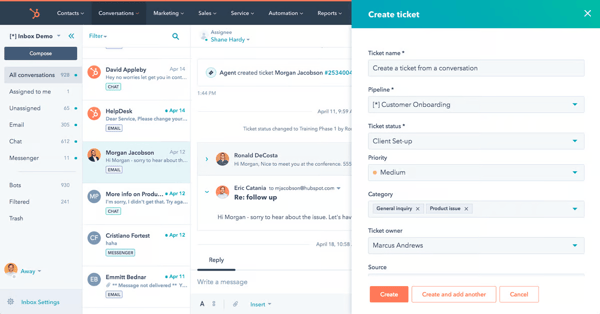
Looking at the highest-rated features, proactive assistance (90%), natural language interaction (89%), and searchable articles (88%) lead the way. That combination is powerful in a self-service context. The knowledge base isn’t just a static repository, it’s searchable, contextual, and integrated directly with ticketing and CRM data.
From what I’ve seen, HubSpot delivers a polished, CRM-connected self-service experience that feels intentionally designed rather than assembled. The portal, knowledge base, and automation layer work together in a way that reflects its broader platform strength — clean UX, fast rollout, and tight alignment with marketing and sales data.
That alignment is especially useful for software and IT companies, which dominate the Grid’s industry representation, where support needs to feel personalized and fast.
That said, some reviewers on G2 note that teams planning to expand into advanced automation, AI tools, or higher ticket volumes may want to review how feature access scales across plans. Based on review feedback, aligning long-term growth plans with the right tier can help ensure the best fit.
Also, teams wanting extremely granular, highly customized service architectures and reporting needs might evaluate how HubSpot aligns with those needs. HubSpot offers strong workflow tools, but highly intricate setups may require careful planning.
Overall, I see HubSpot Service Hub as one of the best customer self-service software options for mid-sized businesses that want an intuitive, branded portal backed by CRM intelligence.
What I like about HubSpot Service Hub:
- Users praise its ease of use and setup. With strong G2 scores for ease of use, ease of setup, and ease of admin, reviewers often mention how quickly teams can launch a branded self-service portal and get agents productive without a heavy technical lift.
- HubSpot Service Hub’s proactive assistance and natural language capabilities are appreciative. G2 feedback highlights how searchable articles, conversational tools, and CRM-connected workflows work together to create a self-service experience that feels guided and contextual.
What G2 users like about HubSpot Service Hub:
“What I like best about HubSpot Service Hub is how everything is integrated. It seamlessly connects with HubSpot CRM, giving support teams a full view of customer data and interactions. The automation saves time on repetitive tasks, and the knowledge base helps customers self-serve. Plus, it’s easy to capture customer feedback and make improvements quickly. It’s a really efficient, all-in-one tool for customer support.”
– HubSpot Service Hub review, Janhvi P.
What I dislike about HubSpot Service Hub:
- Teams planning to expand into advanced automation, AI tools, or higher ticket volumes might want to review how feature access scales across plans. Based on user feedback, aligning long-term growth with the right tier can help ensure the best fit.
- Teams wanting extremely granular, highly customized service architectures or reporting structures may want to evaluate advanced configuration capabilities early. While HubSpot offers strong workflow and automation tools, highly intricate enterprise setups may benefit from careful planning.
What G2 users dislike about HubSpot Service Hub:
“Some advanced automation features require higher-tier plans. Customization options for reporting could be deeper. Overall, HubSpot Service Hub is perfect for any team serious about delivering excellent customer service while keeping processes efficient. It’s an investment that pays off in customer loyalty and team productivity.”
– HubSpot Service Hub review, Md Mudassir A.
Want more on HubSpot? Read this guide on HubSpot implementation to know all about it.
5. Freshdesk: Best for easy-to-deploy self-service
G2 rating: 4.4/5⭐
Freshdesk remains a top-tier contender as customer self-service software, specifically praised for its ease of use and AI-driven “deflection” (solving problems before they reach an agent).
It’s widely adopted across segments, 49% small business, 40% mid-market, and 11% enterprise, which tells me it’s flexible enough to grow with a team but still accessible for leaner operations like Zendesk. On G2, it holds a strong 4.4 out of 5 rating across 3,500+ reviews, which reinforces its steady reputation in the market.
Based on my research, Freshdesk’s self-service strategy covers the three main pillars we expect out of any customer self-service software: the knowledge base, community forums, and AI-powered assistance. You can create a branded help center that matches your website’s look and feel without needing deep coding knowledge. It supports multi-product portals and over 40 languages.

It’s Freddy AI agent can resolve complex, repetitive queries end-to-end. It uses natural language processing to suggest relevant articles to customers even as they are typing their ticket.
Looking at the Grid Report, a few things stand out immediately. Ease of use scores 90%, ease of admin 89%, and ease of setup 88%. Those are meaningful numbers in a category where implementation friction can slow everything down.
The highest-rated features align closely with what you’d expect from strong customer self-service software. Knowledge base leads at 89%, with automation and searchable articles both at 88%.
Industry representation also reflects digital-first businesses. Information Technology and Services and Computer Software dominate the user base, with financial services, internet companies, and education management also strongly represented.
Based on G2 feedback, some users mention they’d like to see more advanced AI-driven capabilities, such as deeper ticket summarization and expanded automation intelligence. Teams prioritizing more extensive AI tooling may want to evaluate how those features align with their expectations, whereas others benefit from a focused, production-ready approach.
I’ve also come across feedback on G2, noting that teams who rely heavily on mobile workflows may want to assess the mobile app experience early. While it enables ticket management on the go, some users mention that certain features are more robust on the web version.
All things considered, I’d say Freshdesk is the best choice for SMBs and mid-market companies that want a polished, modern self-service portal without the “enterprise weight” of competitors like Salesforce or Zendesk. It excels at ticket deflection—meaning it is very good at making sure your agents only talk to customers when absolutely necessary.
What I like about Freshdesk:
- Users consistently highlight its ease of use and setup. With strong G2 scores for ease of use, ease of admin, and ease of setup, reviewers often mention how quickly teams can get up and running without extensive training.
- A major strength of Freshdesk is its knowledge base feature. G2 feedback frequently points to well-organized, searchable articles and practical automation rules that help reduce repetitive tickets and improve resolution efficiency.
What G2 users like about Freshdesk:
“What I like most about Freshdesk is how simple and well-organized it makes managing customer support. The interface is clean and easy to navigate, even for new users. Ticket tracking, task assignment, and customer replies all happen in one place, which really helps reduce confusion and keep everything consistent. I also appreciate how Freshdesk automates repetitive actions, such as ticket categorization and status updates, and that ends up saving a lot of time. On top of that, the ability to create canned responses and use tags makes it much faster to handle a high volume of requests without losing track of details.”
– Freshdesk review, Eric,
What I dislike about Freshdesk:
- Teams wanting more advanced AI-driven capabilities, such as deeper ticket summarization or expanded intelligent automation, may want to evaluate how Freshdesk aligns with those expectations. While users value its core automation, some mention interest in broader AI tooling.
- Teams that rely heavily on mobile-first workflows might plan to review the mobile app experience early. Based on user feedback, core ticket management works well, but certain advanced configurations are more fully featured on the web version
What G2 users dislike about Freshdesk:
“Sometimes, it slows down while switching between tickets within the portal. I hope it will be fixed soon via updates and fixes. The mobile-based application of this tool is not as smooth as it should be.”
– Freshdesk review, Vibor J.
6. Fin by Intercom: Best for conversational AI self-service
G2 rating: 4.5/5⭐
When I look at Fin by Intercom in the context of customer self-service software, it feels purpose-built for the AI-first era of support. Intercom has long been associated with conversational customer engagement, so I was curious to see how Fin, its AI-powered support agent, performs when evaluated through G2 data and real user feedback. The short answer: it’s earning strong validation.
Fin holds a 4.5 out of 5 rating on G2 across more than 3,600 reviews, and the adoption breakdown is telling — 61% small business, 36% mid-market, and 3% enterprise. That mix reflects where Intercom has historically been strong: fast-growing digital companies that want modern, conversational support without heavyweight infrastructure.
Fin is arguably the best for conversational self-service, in my opinion. While legacy tools offer more “structured” portals, Fin excels at answering complex questions in real time with its Fin AI agent, without requiring users to search through a list of articles.
Looking at the highest-rated features, the knowledge base and searchable articles both score 91%, with automation close behind at 89%. The AI agent draws directly from your knowledge base, turning static documentation into conversational answers. Instead of customers browsing through categories, they ask a question and receive contextually grounded responses in real time.
Industry representation reinforces this positioning. Computer software and information technology companies dominate the user base, with a strong presence in financial services, consumer services, and marketing.
What stands out to me most is how tightly the AI is integrated into the broader support workflow. It’s not just a chatbot bolted onto a help center. Fin is designed to autonomously resolve questions using verified knowledge content, escalate intelligently when needed, and continuously learn from interactions. When implemented well, it becomes a frontline support layer that operates 24/7.
That said, G2 feedback makes it clear that Fin’s performance is closely tied to the quality of your knowledge base. Teams handling highly niche, edge-case, or deeply technical questions may want to evaluate how detailed and structured their help documentation is before rollout. Because Fin relies heavily on existing content, gaps or unclear articles can lead to incomplete answers or situations where a human agent needs to step in.
I’ve also seen users mention that the per-resolution pricing model is something to plan around carefully. Teams expecting very high automated resolution volumes may want to forecast usage and align budgets accordingly. While the value can be significant when automation replaces manual work, understanding cost at scale is important.
Overall, I see Fin by Intercom as one of the best customer self-service software options for SaaS and digital-native companies that are ready to invest in AI-led support. It’s especially well-suited for small to mid-market teams at fast-moving SaaS companies, fintech, and e-commerce companies that prioritize modern UX, fast deployment, and AI-driven resolution as a core part of their support strategy.
What I like about Fin by Intercom:
- I like how strongly users rate its knowledge base integration and automation. G2 insights show high scores for searchable articles and automation, and reviewers often mention how effectively Fin turns well-structured help content into fast, conversational answers.
- I also appreciate the ease-of-use factor. With strong ratings for ease of use and admin, many users highlight how quickly teams can deploy AI-driven support and start resolving repetitive queries without heavy setup.
What I like about Fin by Intercom:
“What I like most about Fin by Intercom is how effectively it delivers high-quality, on-brand AI support at scale without sacrificing accuracy or control. In my daily work, Fin runs seamlessly within the Intercom ecosystem, drawing on existing help center content, conversation history, and established workflows. This keeps setup quick and helps minimize operational overhead. From a customer support perspective, Fin also resolves a high percentage of customer questions autonomously, which reduces ticket volume and frees human agents to focus on more complex or higher-value issues.”
– Fin by Intercom review, Jan B.
What I dislike about Fin by Intercom:
- Teams handling highly niche, edge-case, or deeply technical questions might plan to review their knowledge base quality early. Based on user feedback, Fin’s accuracy depends heavily on how clear and comprehensive your help documentation is.
- Teams expecting high automated resolution volumes may want to forecast usage carefully. Since pricing is tied to resolutions, aligning projected volume with budget expectations can help ensure the best long-term fit.
What G2 users dislike about Fin by Intercom:
“What I dislike is that accuracy on niche/specific questions is lower. Fin depends a lot on how well your help‑docs / knowledge base cover a topic. If your content isn’t clear, detailed, or well‑structured, Fin may misunderstand or give incomplete answers. Users report that for edge‑cases or very particular product questions, Fin sometimes “hallucinates” or has to be rescued by a human.”
– Fin by Intercom review, Raphael C.
7. UserGuiding: Best for in-app self-service
I know about UserGuiding as one of the best digital adoption platforms for onboarding new customers, but it was actually a find for me in the best customer self-service software category. Unlike traditional help desk tools that focus primarily on ticketing, UserGuiding approaches self-service from inside the product experience itself. That shift in perspective immediately stood out to me.
On G2, it holds an impressive 4.7 out of 5 rating across 700+ reviews. It has adoption spread across 54% of small businesses, 40% of mid-market, and 6% of enterprise, resonating strongly with growing SaaS teams that care about onboarding, feature adoption, and reducing support friction early in the customer journey.
UserGuiding’s primary value lies in its Resource Center approach, which acts as a centralized hub for users who prefer solving problems independently. This self-service strategy integrates interactive walkthroughs and onboarding checklists that guide users through complex tasks, such as setting up a first campaign, by highlighting specific buttons in real-time.
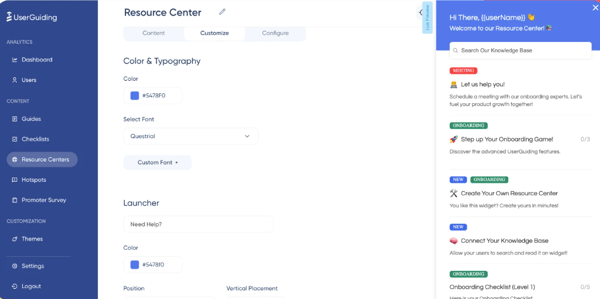
To further reduce the volume of routine support tickets, the platform also features a native knowledge base and an AI-powered assistant capable of handling “how-to” queries 24/7. This entire ecosystem is delivered through an in-app widget that houses FAQs and search bars, providing a seamless layer of support exactly where and when the user needs it.
The highest-rated features on G2 align with this:knowledge base, branding, and searchable articles, all at 90%, showing that UserGuiding is strong at traditional self-service elements.
But the most important metrics that caught my attention were time to ROI. Users report seeing value in about 7 months, noticeably faster than the category average of 11 months. For teams trying to justify investment quickly, that shorter runway matters. It suggests implementation is manageable and adoption happens relatively smoothly.
Industry representation leans heavily toward computer software and information technology, with additional presence in education, financial services, and accounting.
A few reviewers on G2 note that teams wanting highly advanced design control or deeply customized branding elements may want to review styling flexibility early. While UserGuiding offers strong branding capabilities and easy visual customization, organizations with very specific UI/UX standards might plan configurations carefully.
Also, teams new to digital adoption platforms might also plan for a short onboarding period. Although ease of use scores are strong, some users mention there’s a bit of a learning curve when setting up flows, segments, and in-app experiences effectively.
If your goal is to guide users in context, shorten onboarding cycles, and reduce repetitive support tickets without heavy development resources, I’d recommend Userguiding.
What I liked about UserGuiding:
- I like how effectively it brings self-service directly inside the product experience. G2 reviewers frequently highlight in-app guides, tooltips, and onboarding flows as practical tools for reducing repetitive support tickets while improving feature adoption.
- I also appreciate how quickly teams report seeing value. With a time to ROI of 7 months, faster than the category average, users consistently mention measurable impact on onboarding efficiency and user engagement.
What G2 users like about UserGuiding:
“UserGuiding is quite straightforward to use, and my developers find it easy to customize as well. I really appreciate the wide range of features it offers, which enables me to deliver product updates, interactive tours, promotions, hotspots, help articles, FAQs, and banners. I also value the option to launch NPS and surveys, as this allows me to gather product feedback quickly and support my sales team with referrals.”
– UserGuiding review, Rachael L.
What I dislike about UserGuiding:
- Teams wanting highly advanced design control or deeply customized branding elements may want to review styling flexibility early. While users value its visual customization tools, organizations with very specific UI/UX standards might plan configurations carefully.
- Teams new to digital adoption platforms might plan for a short onboarding period. Although usability scores are strong, some reviewers note there is a learning curve when setting up flows, segments, and in-app experiences effectively.
What G2 users dislike about UserGuiding:
“Sometimes the customization options feel limited, especially when trying to match very specific branding or layouts. There are also moments when the editor feels a bit laggy, especially with more complex flows. It would be great to have more flexibility and styling control without using custom CSS.”
– UserGuiding review, Catherine L.
Frequently asked questions (FAQ) on the customer self-service software
Got questions? G2 has the answers.
Q. Which are the top-rated platforms for community-driven customer support?
Top-rated platforms for community-driven customer support include Salesforce Service Cloud, Zendesk, and Zoho Desk. These tools allow businesses to build branded customer communities where users can ask questions, share solutions, and reduce repetitive support tickets through peer-to-peer engagement.
Q. Which are the best self-service platforms for e-commerce companies?
The best self-service platforms for e-commerce companies include Freshdesk, Zendesk, and Salesforce Service Cloud. These tools support high ticket volumes, order-related workflows, omnichannel communication, and scalable knowledge bases suited for fast-moving online businesses.
Q. Which are the top tools for building customer knowledge bases?
Top tools for building customer knowledge bases include HubSpot Service Hub, Freshdesk, Salesforce Service Cloud, and Zoho Desk. They offer structured article management, strong search functionality, branding controls, and analytics to improve content discoverability and ticket deflection.
Q. Which is the best customer self-service platform for reducing support tickets?
If reducing support tickets is your primary goal, Fin by Intercom and UserGuiding stand out. Fin uses AI to resolve repetitive queries conversationally, while UserGuiding reduces inbound questions by guiding users directly inside the product experience.
Q. Which customer self-service software integrates with chatbots?
Most leading customer self-service software integrates with chatbots, including Fin by Intercom (AI-native), Zendesk, Freshdesk, HubSpot Service Hub, and Salesforce Service Cloud. These platforms connect chat automation directly to knowledge bases and ticketing workflows.
Q. Which are the top self-service platforms with analytics dashboards?
Top self-service platforms with analytics dashboards include HubSpot Service Hub, Salesforce Service Cloud, Zendesk, and Freshdesk. They provide reporting on ticket deflection, knowledge article performance, and support trends to help teams measure ROI.
Q. Which are the best tools for combining self-service with live support escalation?
The best tools for combining self-service with live support escalation include Zendesk, Salesforce Service Cloud, Freshdesk, and HubSpot Service Hub. These platforms allow customers to move seamlessly from articles or bots to human agents when needed.
Q. Which are the best tools for multi-language customer self-service?
The best tools for multi-language customer self-service include Zoho Desk, Zendesk, Salesforce Service Cloud, and Freshdesk. These platforms support localization features that help global teams deliver consistent support across regions.
Q. Which self-service platform offers AI-powered content suggestions?
Fin by Intercom and HubSpot Service Hub stand out for AI-powered content suggestions. Fin uses AI to generate conversational responses directly from your knowledge base, while HubSpot surfaces proactive assistance and contextual article recommendations within the customer portal.
Q. Which platform offers the most advanced search in self-service portals?
Platforms like Zendesk, Freshdesk, and Fin by Intercom offer advanced search capabilities in their self-service portals. They combine intelligent search, contextual recommendations, and AI-driven query understanding to help customers find relevant answers quickly.
Start serving
If there’s one thing I’ve learned from researching and comparing these tools, it’s this: the best customer self-service software isn’t just about deflecting tickets — it’s about reshaping how customers experience support. The strongest platforms don’t treat self-service as a static FAQ page. They connect knowledge, automation, AI, and real-time guidance into something that feels intentional and scalable.
What really stood out to me is how much the category is shifting toward proactive and AI-driven resolution. Whether it’s Fin answering conversationally, UserGuiding guiding users in-app, or Salesforce and HubSpot embedding automation into the portal itself, self-service is moving from “search and hope” to “ask and resolve.” That shift changes the role of support teams entirely — from answering repetitive questions to handling higher-value, complex interactions.
At the end of the day, the right choice depends on your team’s size, workflow complexity, and how deeply you want automation integrated into your customer journey. But if your goal is to reduce ticket volume without sacrificing experience, investing in modern self-service tools is no longer optional — it’s strategic.
If you’re ready to explore AI-driven automation further, compare top AI customer support agents and verified reviews on G2.
