



Product data rarely breaks all at once. I’ve seen it unravel gradually, inconsistent attributes across marketplaces, outdated specs on distributor portals, spreadsheets passed between teams, and product launches delayed because no one is sure which version of the information is correct.
That’s usually when teams start looking for the best Product Information Management (PIM) software.
Product information management (PIM) software helps ecommerce, retail, manufacturing, and distribution teams centralize product data, standardize attributes, manage localization, enrich content, and syndicate accurate information across sales channels. Instead of juggling spreadsheets, ERP exports, DAM folders, and marketplace templates, a PIM system creates a single source of truth for product catalogs.
To identify the most reliable options, I evaluated more than 20 PIM platforms using verified G2 reviews and market presence data. In this guide, I’ll walk through seven leading solutions, Plytix, Pimberly, 1WorldSync, Sales Layer, Syndigo, Quable, and Akeneo, and explain how each platform helps teams manage large product catalogs, maintain data accuracy, and scale multi-channel commerce operations.
7 best PIM software for 2026: My top picks
- Plytix Cloud PIM and DAM: Best for product organization and easy data handling
For SMBs to simplify product management with strong import/export capabilities and support for various file types. ($499/mo) - Pimberly SaaS PIM & DAM: Best for data quality and global localization
Blends PIM with Digital Information Management (DIM) for brands focused on global reach, compliance, and localization. ($36,000/year) - 1WorldSync: Best for global data collection and syndication
For standardized data collection, classification, and publishing, especially across retail and manufacturing. (Pricing available on request). - Sales Layer PIM: Best for centralized product data and digital asset control
For centralizing product content across channels while offering robust access rights and digital asset management. (Pricing available on request) - Syndigo: Best for multi-channel product data syndication
Retail-ready product data syndication that distributes validated product content across retailer networks. (Pricing available on request) - Quable PIM: Best for mid-market teams managing structured product catalogs
Flexible product data modeling that structures complex catalogs, attributes, and media in one PIM system. (Starting at $1,745) - Akeneo PIM: Best for advanced product hierarchies and KPI tracking
For advanced data lineage, metadata management, and KPI monitoring. (Starting at $45,000/mo)
*These PIM software are top-rated in their categories, according to the G2 Winter 2026 Grid Reports. I’ve added their monthly/yearly pricing, wherever available, to make comparisons easier for you.
7 best PIM software I strongly recommend
When I started researching product information management tools, one thing became clear quickly: product data can get messy fast without a structured system behind it. Specs get scattered across spreadsheets, assets live in separate folders, and updates don’t always reach every channel at the same time. Over time, this leads to inconsistent listings, slower product launches, and unnecessary friction for teams.
That’s why, before shortlisting tools, I focus on how product data moves through existing workflows. A solid setup should support data quality, accessibility, version control, and centralized product repositories, enabling teams to manage information efficiently and align it with business goals.
Another key factor when evaluating leading PIM solutions for managing product data is integration. Product data rarely lives in one system; it needs to connect with ERPs, CRMs, ecommerce platforms, and marketing tools so updates flow consistently across channels. This becomes especially important for teams looking for the best PIM software for eCommerce site management or managing large product catalogs across marketplaces.
During my research, I also noticed that many buyers rely on peer insights when comparing PIM software with the best customer reviews, since real user feedback often highlights how well a platform handles integrations, catalog management, and collaboration.
The growing demand reflects the criticality of product data management. The global product information management market is projected to grow from $6.74 billion in 2026 to $20.66 billion by 2034, at a CAGR of 15%.
That momentum signals a clear shift: organizations are increasingly investing in PIM platforms to centralize product data, improve collaboration, and scale product operations across channels.
How did I find and evaluate the best PIM software in 2026?
I started with G2’s Grid Reports to build a shortlist of the top Product Information Management (PIM) software based on G2 Score, user satisfaction, and overall market presence.
Next, I analyzed G2 reviews at scale with AI assistance to identify the patterns that repeatedly show up for teams managing product data. I looked for insights about what actually helps businesses centralize product information, enrich product content, and distribute consistent data across multiple channels. I paid close attention to feedback on catalog management, data enrichment workflows, multichannel syndication, integrations, and overall usability, since these areas often determine how effectively a PIM system supports growing product catalogs.
Since I couldn’t test every platform firsthand, I relied on insights from professionals who use these tools daily and validated those observations against verified G2 reviews.
The screenshots included in this article come from G2 vendor profiles and publicly available product documentation.
What makes the best PIM software solutions: My selection criteria
To land on these picks, I looked at what consistently surfaced in G2 Grid Reports, satisfaction data, and recurring review themes. My goal was to understand whether each tool actually helps teams organize, enrich, and distribute product data efficiently across systems and sales channels.
Below are some factors you can’t miss out on if you are researching for an effective PIM software:
- Centralized product data management: I prioritized platforms that make it easy to store, organize, and maintain product information in one place. The best PIM systems provide a single source of truth where teams can manage product attributes, descriptions, media assets, and technical specs without juggling multiple files or spreadsheets.
- Data quality and enrichment capabilities: I looked for tools that help teams improve product data rather than just store it. Strong PIM solutions offer bulk editing, attribute standardization, validation rules, and enrichment workflows so teams can maintain consistent, high-quality product information across catalogs.
- Multi-channel product distribution: I evaluated how well each platform publishes and synchronizes product data across ecommerce sites, marketplaces, apps, and internal systems. The best tools simplify product syndication so teams can update product information once and distribute it across multiple channels without manual duplication.
- Integration with existing business systems: Since product data rarely lives in isolation, I prioritized PIM platforms that integrate smoothly with ERP, CRM, e-commerce platforms, and marketing systems. Strong integrations ensure product updates flow consistently across the entire tech stack.
- Catalog scalability and performance: I paid attention to how well each platform handles large product catalogs, complex attribute structures, and growing product lines. The best systems allow teams to scale product databases without slowing down workflows or creating data management bottlenecks.
- Workflow collaboration and governance: I looked for features that support collaboration across product, marketing, and operations teams. The strongest tools include role-based permissions, approval workflows, and version control to keep product data organized and accountable.
- Usability and adoption across teams: I also considered how easy the platform is to use for both technical and non-technical teams. The best PIM software balances structured data management with intuitive interfaces so teams can manage product information without heavy technical overhead.
No tool performs perfectly across every criterion, and you’ll see trade-offs in the picks. But the PIM platforms on this list consistently stand out where it matters most: centralized product data management, strong integrations, scalable catalog handling, and workflows that help teams maintain accurate product information across channels.
Out of 20+ tools that I initially shortlisted, I went ahead and did a nose dive into the 7 best PIM tools in 2026. To be included in this category, a software must:
- Collect and unify product information from various, separate files into one source
- Identify and fix problematic or inconsistent product data and metadata
- Provide search and filtering functions that can be used internally or online by buyers
- Organize product data based on their characteristics, attributes, and similarities
- Push product information out to e-commerce, retail, social media, and marketplaces
- Analyze product data, its quality, and usage across multiple channels
*This data was pulled from G2 in 2026. Some reviews may have been edited for clarity.
1. Plytix Cloud PIM and DAM: Best for product organization and easy data handling
G2 Rating: 4.7/5 ⭐️
Plytix PIM helps you reduce your dependency on manual spreadsheets and third-party tools by consolidating product data across various channels into one unified platform. It also cuts down on data silos, increases multichannel syndication, and improves your time to market.
Many G2 reviewers highlight how intuitive Plytix is to use. The interface is described as clean and easy to navigate, making it accessible not just for data specialists but also for broader cross-functional teams. According to G2 Data, Plytix scores 92% for ease of use, which aligns closely with how often reviewers describe it as approachable and simple to adopt.
Centralizing product data is consistently mentioned as one of Plytix’s strongest advantages. Reviewers note that bulk editing significantly reduces manual work, allowing teams to update large catalogs efficiently. Instead of juggling spreadsheets, users describe a more collaborative and structured environment for managing product information. That strength shows up clearly in G2 Data as well, where Plytix holds an 88% score in data quality, reinforcing its reputation for structured and reliable product data control.
Team collaboration also comes up frequently in G2 reviews. Users appreciate the ability to assign responsibilities, track changes, and maintain visibility across departments. Customer support is another commonly praised area, with many reviewers describing the support team as responsive and helpful during onboarding and ongoing use.
The brand portals feature is often cited as a valuable tool for sharing curated product catalogs with partners and distributors. However, some reviewers mention that layout flexibility and deeper customization options could enhance the experience further.
Plytix’s freemium model is viewed as a practical entry point for startups and small teams. As organizations upgrade, features like advanced channel management and expanded custom attributes allow for more structured workflows and multi-channel distribution, which reviewers say becomes especially useful as catalog complexity grows.

G2 reviewers often highlight how approachable and collaborative Plytix feels, especially for centralizing product data and reducing spreadsheet chaos. That said, some users mention that setting up attribute hierarchies can feel a bit rigid, and advanced functions are occasionally tucked behind extra clicks. Teams with straightforward catalogs tend to move comfortably, but those managing highly complex data structures may want to plan their setup carefully from the start.
And while the platform performs well for small to mid-sized catalogs, a few reviewers note slower performance when handling very large SKU volumes. For growing ecommerce brands, this is usually manageable, but larger organizations with massive product libraries may want to evaluate how it scales alongside their expansion.
Overall, Plytix Cloud PIM and DAM help manage product data, integrate data seamlessly, and offer multi-channel product distribution to attract more conversions.
What I like about Plytix Cloud PIM and DAM:
- Plytix PIM completely transformed how we manage product data and digital assets. The platform is incredibly user-friendly and intuitive, even to the members who aren’t super tech-savvy.
- Plytix helps streamline the product listing process and makes life easier for product teams.
What G2 users like about Plytix Cloud PIM and DAM:
“Plytix is fairly intuitive and feature-rich. I especially appreciate that the team is actively developing the product and frequently rolling out new features. Formula attributes and multilevel inheritance, for example, solved huge problems for us. I also really like the recent UI changes, particularly the move away from paginated pages. The new automations look especially promising, as do the new AI features, which I am currently working on integrating into our workflow.”
– Plytix PIM review, Travis M.
What I dislike about Plytix Cloud PIM and DAM:
- G2 reviewers like how easy Plytix is to use, but teams building complex attribute structures say the hierarchy can feel a bit rigid, and advanced settings may take extra clicks to access.
- Users also note that performance is smooth for small to mid-sized catalogs, though larger SKU volumes can introduce occasional lag, something bigger organizations may want to plan for as they scale.
What G2 users dislike about Plytix Cloud PIM and DAM:
“I would like it to include some additional features, especially related to formulas. I would also greatly appreciate having an option that allows detecting inconsistencies in the data, as we have not been able to do so until now, and these errors often go unnoticed. Additionally, it would be very useful to have a dashboard that shows metrics on the use of the tool and the behavior of different users within it.”
– Plytix PIM review, Fernando D.
2. Pimberly SaaS PIM and DAM: Best for data quality and global localization
G2 Rating: 4.4/5 ⭐️
Pimberly SaaS PIM and DAM is a cloud-based PIM tool that manages product data across multiple channels. It is designed to optimize product workflows for sales, marketing, and e-commerce applications and is used by several industries across fashion, retail, e-commerce, and banking to load and manage product data. According to G2, Pimberly holds an 85% rating in data quality, which aligns well with feedback from teams managing large and complex product catalogs.
I’ve analyzed Pimberly for quite some months now, and honestly, it’s made managing product data feel way less chaotic. What stood out to me first was how smooth the export and import functionality is, especially when you’re juggling thousands of SKUs. That operational efficiency is backed by G2’s 86% score for workflows, reinforcing how well the system supports structured, repeatable product processes. It makes onboarding new products super easy, and bulk uploads are fast enough that I don’t find myself waiting around staring at a loading screen.
The UI is slick. It feels like it was designed with actual users in mind; the search function actually finds what you’re looking for, and the whole platform is extremely intuitive.
For users without deep technical expertise, the platform is generally approachable and easy to navigate without heavy IT involvement. At the same time, it still offers enough configurability for teams responsible for managing and maintaining product data workflows.
The ability to tailor feeds and channels based on specific markets or retailers is a game-changer. For people working with multilingual and multichannel product content, rest assured, Pimberly handles that complexity really well.
Users frequently highlight the responsiveness and product expertise of the support team. During implementation, support teams are often described as helpful in guiding organizations through data structure planning and metadata setup, making the onboarding process feel more manageable.
It’s clear the platform is designed to scale. Reviewers on G2 highlight the value of advanced data modeling and channel customization features available in higher-tier plans, especially for organizations managing complex product catalogs.
One feature that surprised me is the integrated digital asset management (DAM). It’s seamlessly tied into the PIM, so linking product data with images, videos, and documents happens automatically once you set up the logic. That might save your creative team so much time. Plus, permissions and user roles are easy to manage across departments, which is huge if you’re working in a bigger team.
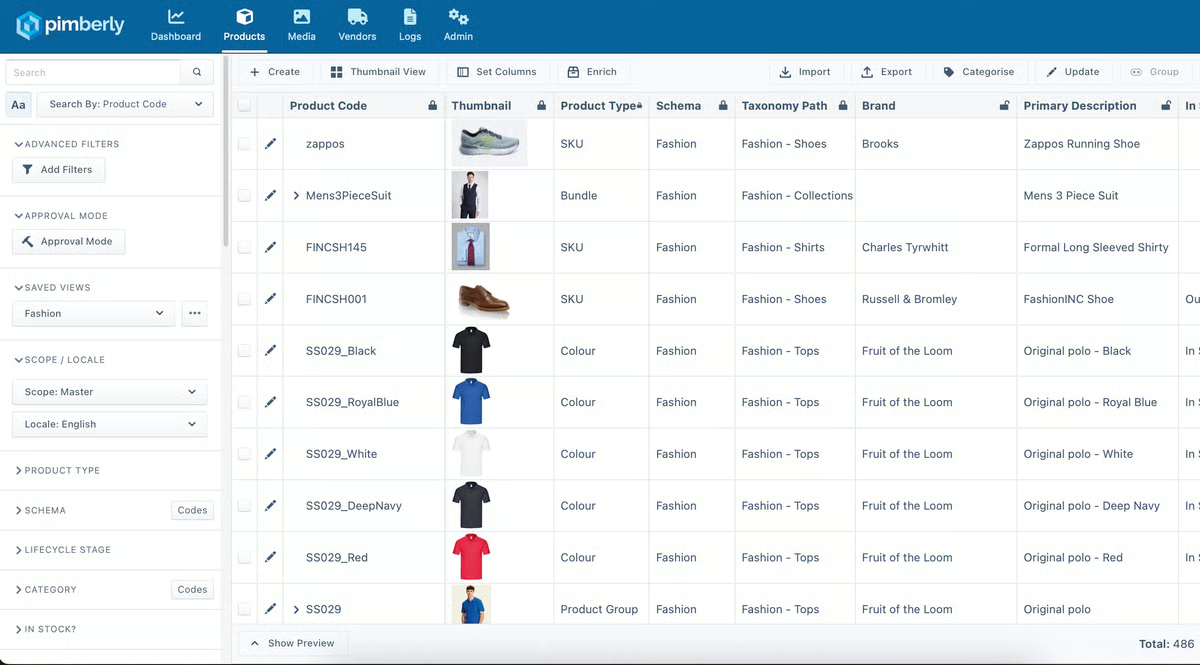
Based on G2 feedback, users managing large datasets and media-rich assets appreciate the platform’s centralized control, but some mention occasional slowdowns during uploads. Teams working with high volumes of files may want to factor in that brief lag when planning tight turnaround timelines.
Reviewers also value the available automation features, though a few note that more niche or highly specific workflows may still require manual adjustments. Teams with straightforward processes tend to move smoothly, while those aiming for deeper, end-to-end automation may need to account for a bit of extra hands-on configuration.
Overall, Pimberly plays a key role in organizing your SKUs, automating sales and marketing workflows, and integrating product data with the right commerce channel to give a supreme customer experience.
What I like about Pimberly SaaS PIM and DAM:
- Pimberly allows you to centralize and standardize your data, which greatly helps in business intelligence.
- I noticed that Pimberly’s platform is intuitive and can easily be integrated with a company’s existing systems.
What G2 users like about Pimberly SaaS PIM and DAM:
“PIMBERLY PIM is an easy-to-use system that allows me to easily create new products and manage existing products in our catalogue. It is also easy for me to bulk import and export data to clean products in bulk, allowing for ease of use and speed, especially when I use it daily.”
– Pimberly SaaS PIM and DAM review, Craig T.
What I dislike about Pimberly SaaS PIM and DAM:
- G2 reviewers appreciate how well it handles large, media-rich product data, but some note occasional sluggishness during uploads. Teams working under tight deadlines or managing very large asset batches may want to account for brief slowdowns.
- Users also like the built-in automation, though a few mention that niche or highly specific workflows still require manual tweaks. For teams with straightforward processes, it works well, but those seeking deeper automation coverage may need to plan for some hands-on adjustments.
What G2 users like about Pimberly SaaS PIM and DAM:
“Occasionally I need to look for particular products on PIM in my role, and – mostly because of my own infrequency of use of the function – it can take a couple of attempts for me to filter for the products I need, but I acknowledge this is because I don’t have to do this regularly.“
– Pimberly SaaS PIM and DAM review, Matt N.
Learn how you can safeguard your product assets safely with product portfolio management and create a secure internal library of product resources.
3.1WorldSync: Best for global data collection and syndication
G2 Rating: 4.6/5 ⭐️
If there’s one thing 1WorldSync does exceptionally well, it’s retailer syndication. Everything in the reviews points back to that core strength: the ability to push structured product data into multiple retailer ecosystems without manually recreating listings every time.
When I read through G2 feedback, the recurring theme wasn’t just “it works,” it was that it simplifies complex retailer requirements in a way spreadsheets simply can’t. According to G2 Data, 1WorldSync scores 92% for meeting requirements, which lines up with how frequently users say it handles structured product onboarding exactly the way large retail networks demand.
A major reason for that confidence is the depth of its support for detailed item data. Reviewers consistently talk about managing GTINs, enriched specifications, retailer-specific templates, and compliance fields in one centralized system. Instead of juggling disconnected portals, teams describe using 1WorldSync as a single control center for data validation and synchronization. That level of structure becomes especially important when managing thousands of SKUs across different retail standards.
Multi-retailer publishing is another capability that shows up repeatedly in reviews. Users highlight how updates made inside the platform automatically cascade to connected trading partners. That automation reduces duplication and lowers the risk of mismatched product data across marketplaces. The “playlist” and retailer requirement guidance tools are mentioned multiple times as helpful guardrails, especially when onboarding new products into unfamiliar retailer environments.
Support is also a consistent bright spot. Reviewers frequently describe the customer team as responsive and knowledgeable, particularly during time-sensitive launches or integration troubleshooting. G2 Data reflects that sentiment, with 93% for quality of support, reinforcing the pattern I saw across multiple reviews. For teams navigating complex retailer ecosystems, having accessible expertise appears to make a meaningful difference.
Reliability and adoption confidence come through as well. With a 91% likelihood to recommend score on G2, users signal trust in the platform for a long-term product syndication strategy. That level of endorsement suggests it’s not just functional, but dependable for ongoing retail expansion.
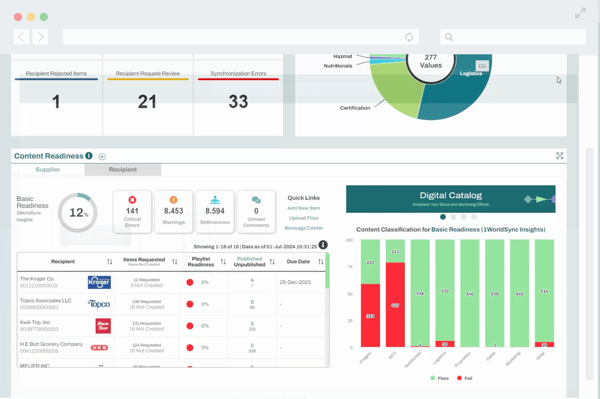
Because 1WorldSync is built to accommodate extensive retailer requirements and structured compliance fields, some reviewers mention that the interface can feel dense at first. That complexity seems to matter most for smaller teams or those new to formal data pools. Organizations already operating in regulated or multi-retailer environments, on the other hand, often view that depth as necessary rather than excessive.
Similarly, advanced automation and certain expanded capabilities sit within higher-tier plans. Users managing enterprise-scale syndication often see value in those premium features, but teams with simpler distribution models may want to align their subscription level carefully with their actual integration needs.
Overall, if you get past the initial hurdles, the productivity boost is real. 1WorldSync can save you countless hours on product setup, syndication, and corrections. With flexible data modeling, you can tailor the platform to suit your business logic.
What I like about 1WorldSync:
- The way it simplifies retailer data pool integration and keeps product information aligned across multiple vendors.
- The consistently strong support team that helps navigate complex onboarding and retailer requirements.
What G2 users like about 1WorldSync:
“I appreciate how 1WorldSync simplifies data pool integration across different retail environments, which greatly benefits our setup process. I find the playlist feature particularly useful, as it clearly outlines the varying requirements for different retailers. I also value the extensive usage of 1WorldSync by more retailers than any other data pool, making it an essential tool for introducing products. This widespread adoption by retailers reflects its reliability and effectiveness.”
– 1WorldSync review, Ryan D.
What I dislike about 1WorldSync:
- G2 reviewers appreciate how comprehensive and structured the platform is for managing retailer requirements, but that same depth can make the interface feel dense at first, so smaller teams or those new to formal data pools may need some ramp-up time before feeling fully confident navigating it.
- Users also value the advanced automation and enterprise-grade capabilities, though some note that certain expanded features are available only in higher-tier plans, which means teams with simpler syndication needs should carefully align their subscription level with the complexity of their distribution strategy.
What do G2 users dislike about 1WorldSync:
“The UI looks outdated, and navigation can be irritating sometimes.”
– 1WorldSync review, Suraj B.
Learn how you can manage your product lifecycle management from start to end to stabilize your backend product workflows and build strong client relationships.
4. Sales Layer PIM: Best for centralized product data and digital asset control
G2 Rating: 4.4/5 ⭐️
What really defines Sales Layer PIM, based on the G2 reviews I analyzed, is how effectively it centralizes product data across channels.
Over and over, reviewers talk about moving away from scattered spreadsheets and disconnected tools into one structured, controlled source of truth. That shift alone seems to be the biggest operational win. According to G2 Data, Sales Layer scores 90% in data quality, reflecting how consistently reviewers rate it as a reliable source of truth for product information. That centralized control significantly reduces version conflicts and spreadsheet chaos.
A big part of that centralization story is bulk management. Multiple reviewers mention how easy it is to update large volumes of SKUs at once, tweak attributes in batches, and keep catalogs aligned across platforms. For teams working with extensive product lines, this is foundational. That bulk functionality pairs naturally with its Excel-friendly workflows. Many users highlight how smoothly they can import, export, and manipulate product data in spreadsheet format.
Multi-channel publishing also shows up repeatedly in reviews as a strength. Users describe pushing product data to multiple platforms and sales channels from a single place, which simplifies syndication and reduces duplication. G2 Data shows that 90% of users are satisfied with Sales Layer PIM’s publishing capabilities, reinforcing its strength in multi-channel product distribution.
The automation around updates means once changes are made in the PIM, they cascade outward without requiring repetitive manual uploads. That consistency across channels is where Sales Layer seems to deliver real operational stability.
Beyond the technical workflow, support is another theme that appears consistently. Reviewers frequently describe the customer support team as knowledgeable, responsive, and solution-oriented. Especially during implementation or complex data mapping scenarios, users mention leaning on support to resolve issues quickly. That kind of reliability matters in a system that sits at the core of product operations.
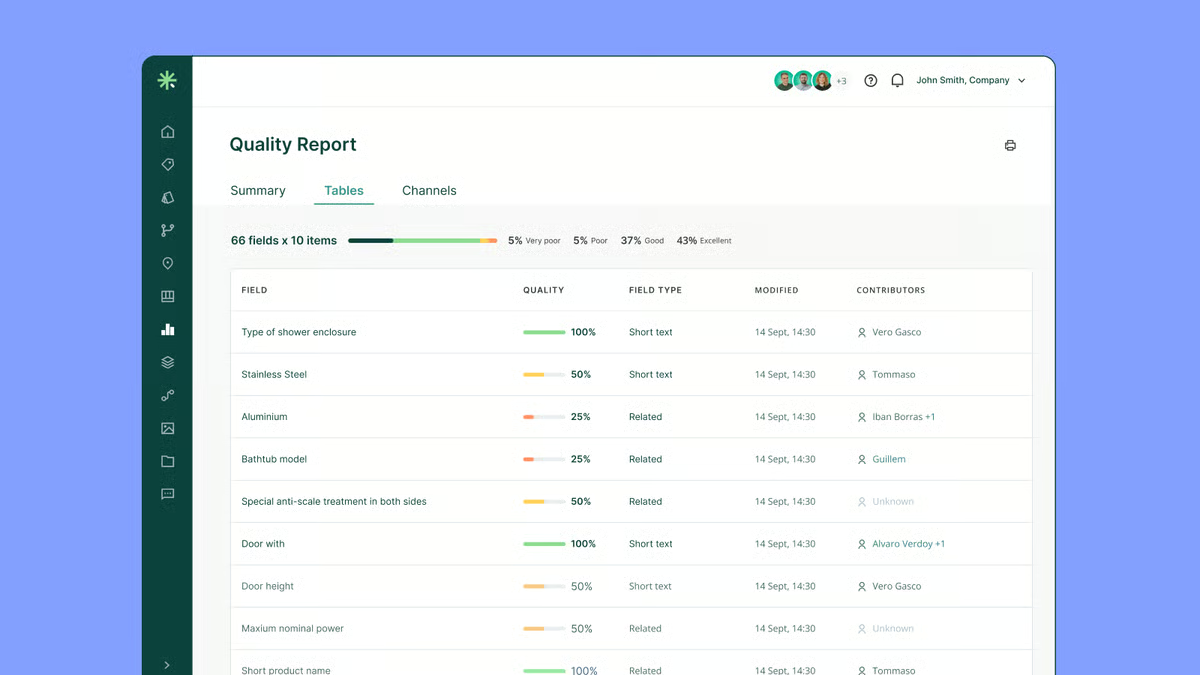
That said, the platform’s strength in structured data modeling does mean teams with complex attribute hierarchies should expect to invest some time up front. While daily usage is described as intuitive, configuring more advanced data structures or logic can require careful setup. For organizations with layered taxonomies or non-linear attribute relationships, it’s not entirely plug-and-play.
Integration depth is another area where context matters. Users appreciate the platform’s core publishing capabilities, but some reviews mention API and connector limitations when integrating with more specialized external systems. For businesses relying on highly customized tech stacks, that may require additional planning or workaround solutions.
Overall, what stands out to me is that Sales Layer PIM is built for operational clarity. It centralizes product data, streamlines bulk catalog management, supports Excel-driven workflows, and simplifies multi-channel publishing in a way that feels grounded and practical.
What I like about Sales Layer PIM:
- Strong bulk editing capabilities for managing large SKU catalogs efficiently.
- Centralized product data model with reliable multi-channel publishing.
What do G2 Users like about Sales Layer PIM:
“The PIM focuses more on working with products and not so much with variants, which is how we actually work in our case. We expect an update with all our suggestions, which have always been addressed when we needed them. Besides what has already been mentioned, the data updates should be faster; currently, the export of Excel takes quite a while to update with the large amount of information we handle.”
– Sales Layer PIM Review, Ines G.
What I dislike about Sales Layer PIM
- While everyday use is straightforward, some G2 users mentioned that setting up more advanced attribute structures can take planning, so teams with complex product taxonomies should budget time for configuration.
- The core publishing works well, but users also mention that businesses with highly customized integrations may need to plan around API or connector limitations depending on their tech stack.
What do G2 users dislike about Sales Layer PIM
“When we initially migrated from PIM to Sales Layer, we had problems with the import of family forms, since Sales Layer is very sensitive and allows the creation of attributes and attribute values regardless of whether they are found in the configuration of the families’ technical sheets. This duplicated the product characteristics if they had a tab or were in plural or singular. We have been able to minimize these cases by using family templates exported directly from SL.”
– Sales Layer PIM Review, Gisselle D.
5. Syndigo: Best for multi-channel product data syndication
G2 Rating: 4.4/5 ⭐️
One thing that makes Syndigo stand out in the PIM category is how tightly it connects product data management with retail content syndication. Instead of just storing product information, the platform focuses on helping brands prepare, validate, and distribute product content directly to retailers and commerce partners from a single environment.
Managing product data internally is one challenge, but ensuring that the same information reaches retailers accurately, in the right format, and at the right time is a completely different layer of complexity. From what I saw in the reviews, Syndigo positions itself right at that intersection, acting as a central hub where teams can manage product data, validate it against retailer requirements, and syndicate it across commerce channels without constantly jumping between systems.
A lot of reviewers describe Syndigo as a place where product content finally becomes centralized. Instead of juggling spreadsheets, retailer portals, and internal databases, teams can manage product attributes, images, and marketing content in one environment and then distribute it outward. On G2, this operational clarity shows up in the platform’s strong ease of admin score of 90%, which makes sense for a tool designed to act as a system of record for product content.
I also noticed repeated mentions of how teams use Syndigo to manage enrichment workflows, validate attributes, and ensure product details are consistent before pushing them to retailers. G2 Data supports that operational focus as well, with 86% satisfaction around workflow capabilities and 83% for data quality, both of which align with the idea that the platform is meant to help teams maintain clean, structured product data at scale.
Product verification and compliance workflows are another capability that stood out in the dataset. Syndigo doesn’t just store product information; it also helps teams ensure that the content meets retailer requirements before it gets published. That validation layer matters because retailers often require specific attribute formats, mandatory fields, or content standards before accepting product data.
Ease of use also appears frequently in the reviews, particularly once teams become familiar with the platform. Many users say the interface makes it relatively straightforward to manage product data, update content, and track changes across their catalog. G2 users reinforce that sentiment with an ease of doing business score of 96%, which is one of the strongest signals in the dataset. The workflow-oriented interface seems to help teams stay organized when managing large volumes of product information, especially when multiple departments are contributing to the same catalog.
Customer support is another theme that consistently appears in the feedback. Reviewers frequently mention Syndigo’s account teams and support staff as responsive and helpful when questions come up during onboarding or when troubleshooting product data issues. That support layer becomes especially important with systems that manage critical product information across multiple retail channels. On G2, this shows up in the quality of support score of 95%, which suggests that users generally feel well-supported while implementing or maintaining the platform.
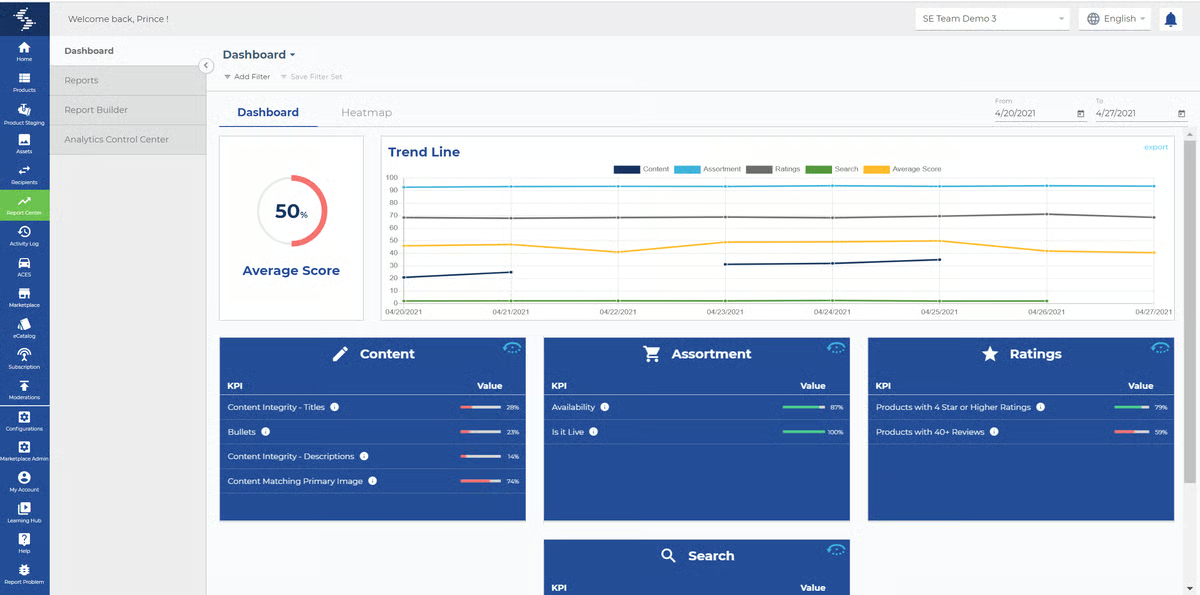
According to G2 reviews, the platform is particularly strong at helping teams distribute product content to retailers through its partner network, and organizations managing large catalogs appreciate that structure, but teams making frequent product updates should expect that some changes require republishing content to clients or channels, which can introduce a few extra steps into the workflow and is something teams with extremely high update frequency may want to plan for.
And while the interface becomes easier to navigate once teams get comfortable with it, several reviewers mention that the platform can feel complex during the initial onboarding phase, so organizations adopting Syndigo for the first time should plan for a learning period and possibly some internal training to make sure everyone understands how the product data workflows connect across their commerce channels.
Overall, the picture that comes through clearly in the G2 reviews is that Syndigo is built for organizations that treat product data as an operational system rather than a simple catalog.
What I like about Syndigo:
- Centralizes product data, enrichment, and syndication workflows in one place, making it easier for teams to manage product content without relying on spreadsheets or multiple systems.
- Strong retailer and commerce partner network that helps brands distribute product information efficiently across multiple channels.
What G2 users like about Syndigo:
“I like that Syndigo helps me publish information and assets without using spreadsheets. It brings all the data together in one place, which is really convenient. The initial setup was very easy.”
– Syndig review, Brenda B.
What I dislike about Syndigo:
- Based on G2 reviews, teams that frequently update product information appreciate the syndication capabilities, but they may need to account for the fact that some product changes require republishing content to clients or retail channels.
- While many users say the interface becomes intuitive over time, organizations implementing the platform for the first time should expect a learning curve during onboarding as teams get familiar with the workflows and navigation.
What G2 users dislike about Syndigo:
“I find using the reporting center harder to use. I also have a hard time choosing the precise location of the hot spots because you can’t zoom in, and you end up having to reload the preview many times until it’s “close enough.”
– Syndig review, Madeline I.
6. Quable PIM: Best for mid-market teams managing structured product catalogs
G2 Rating: 4.4/5 ⭐️
Quable PIM earns its place on this list for its ability to organize and structure product information across complex product catalogs. The platform focuses on building a centralized product data model where teams can manage attributes, media assets, and product information in a single environment. For organizations managing large or evolving catalogs, that structured approach makes product data easier to maintain and scale.
As I looked deeper into the platform, it became clear that Quable is built around the idea of turning scattered product information into a structured, manageable catalog. Teams use it as a central location to manage product attributes, specifications, descriptions, and related content instead of relying on spreadsheets or disconnected systems.
This centralized approach makes it easier to keep product information consistent across a catalog, especially when multiple teams contribute to enrichment and updates. On G2, the focus on maintaining structured product data shows up in the platform’s data quality satisfaction score of 83%.
The interface also plays a role in how teams work with their product catalogs. Rather than presenting product data as a flat list of attributes, the platform organizes information in a structured environment that lets teams navigate product records, attributes, and assets more clearly. This makes it easier to move through product data and understand how attributes and media connect to each product. Adoption trends support that usability as well. On G2, user adoption sits at 76%, suggesting that once the platform is implemented.
One capability that consistently shows up is the product data model’s flexibility. Catalog structures vary widely across industries, and several users highlight that Quable enables them to adapt product attributes and data structures to match their internal product organization. Instead of forcing companies into a fixed structure, the platform allows teams to customize the way product attributes and categories are organized.
Performance is another area that appears frequently in the feedback. Managing large product catalogs can quickly become frustrating when systems slow down under heavy datasets, but several users report that Quable remains responsive even with extensive product information. Actions like updating product attributes, browsing product records, or navigating catalog structures tend to execute quickly.
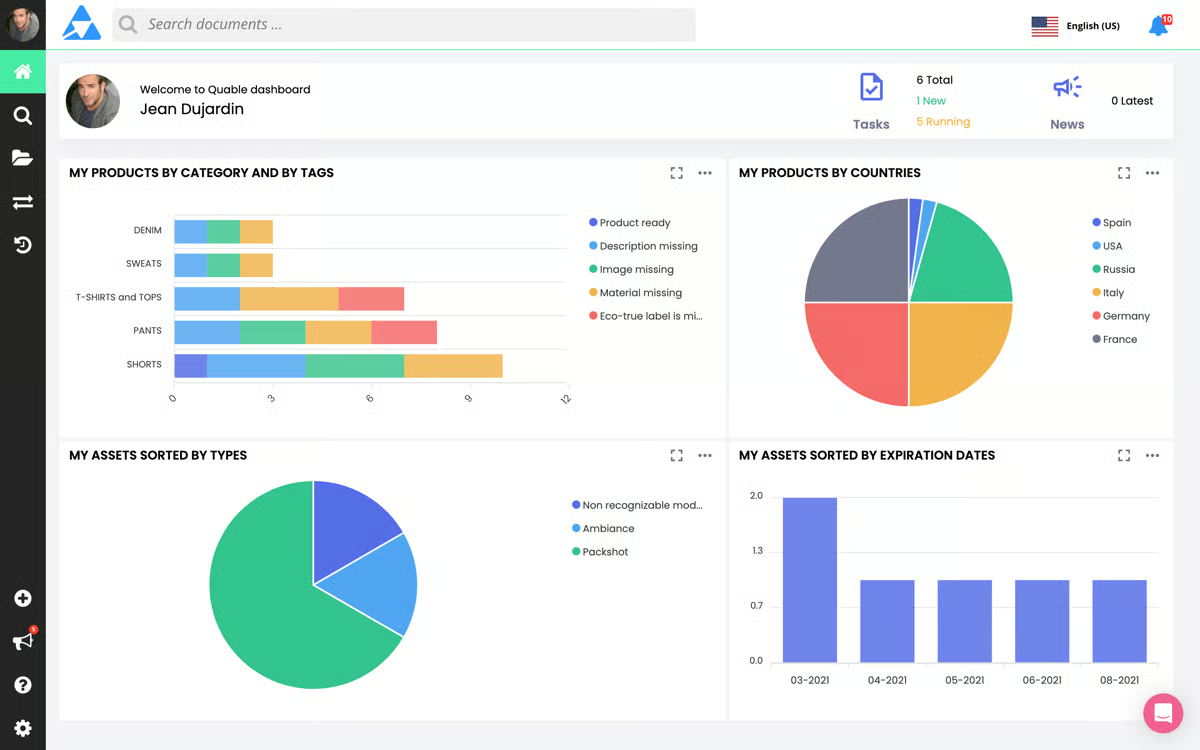
Product content enrichment also extends beyond attributes. Catalogs often rely heavily on visual assets like product images, marketing visuals, or other media files. Several reviewers mention managing product images and visual content within the platform alongside structured product data. Having those assets connected directly to product records helps teams maintain more complete product pages and simplifies the process of locating and updating visual content.
Another capability that stands out is how the platform supports structured workflows around product updates. That structure helps maintain consistency across product records, particularly when multiple contributors are working on the same catalog. According to G2 Data, 93% of users say the product is going in the right direction, which reflects a broader sense that the platform continues evolving around the needs of teams managing complex product information.
And from the reviews I analyzed, teams managing large product catalogs consistently highlight Quable’s structured approach to product data as a major advantage, especially for maintaining clean, organized product records across many SKUs. Organizations that rely heavily on frequent bulk updates, however, may want to carefully plan their catalog workflows, since large-scale mass edits can sometimes require a few additional steps.
Also, while the platform’s structured interface helps teams organize product attributes and media more clearly, some users mention that certain advanced workflows take a little time to fully understand at first. Teams implementing a PIM system for the first time may want to invest in onboarding and internal enablement early, so they can navigate more complex catalog workflows with confidence as their product data operations grow.
Quable PIM comes across as a platform built for teams that want structure and organization around their product information. Between centralized catalog management, flexible product data modeling, strong performance with large datasets, and built-in workflows for managing product updates, the system fits especially well for companies scaling their product catalogs
What I like about Quable PIM:
- Centralizes product attributes, catalog data, and media assets in one structured platform, making it easier to maintain consistent product information.
- Flexible product data model that allows teams to adapt catalog structures and attributes to match their product organization.
What G2 users like about Quable PIM:
“Easy to create products and manage media. Mass creation is quick, and updating references in bulk is easy. I also appreciate being able to have links to media in the DAM.”
– Quable PIM review, Mokhtar K.
What I dislike about Quable PIM:
- Based on G2 reviews, teams managing very large product catalogs appreciate the structured data controls, but bulk product updates may require a few additional steps, so organizations performing frequent mass edits should plan their workflows accordingly.
- While the interface is generally described as clear and structured, teams new to PIM platforms may need time to fully understand advanced workflows and navigation as they become familiar with the system.
What G2 users dislike about Quable PIM:
“The management of output channels should be handled directly from the product sheet. I would like to be able to view and modify the output channels in the product sheet and not on another screen. Not easy to configure, but like all PIM tools on the market.”
– Quable PIM review, Valentin C.
7. Akeneo PIM: Best for advanced product hierarchies and KPI tracking
G2 Rating: 4.4/5 ⭐️
Akeneo PIM is widely recognized in the product experience category for helping B2B and B2C brands scale omnichannel retail operations. Across manufacturing, distribution, retail, and global commerce environments, it’s positioned as a structured solution for managing complex product onboarding and catalog growth.
Based on user feedback, one of Akeneo’s strongest early impressions is how approachable it feels despite its depth. Reviewers frequently describe the interface as clean, modern, and logically organized. Navigation across product categories, attributes, and custom fields is generally straightforward, which reduces friction during adoption. Even teams without deep technical backgrounds report getting comfortable relatively quickly once the structure is in place.
Where Akeneo truly differentiates itself is in managing complex product data at scale. G2 reviewers consistently highlight its strength in handling variant products, layered categorization, and structured attribute sets. For organizations managing thousands of SKUs across multiple marketplaces, that flexibility becomes critical. That capability is reflected in G2 Data, where Akeneo scores 87% for classification, reinforcing its reputation for handling complex product hierarchies consistently.
Bulk editing tools, customizable export builders, and a highly configurable import/export engine support consistent data distribution while maintaining marketplace-specific nuances.
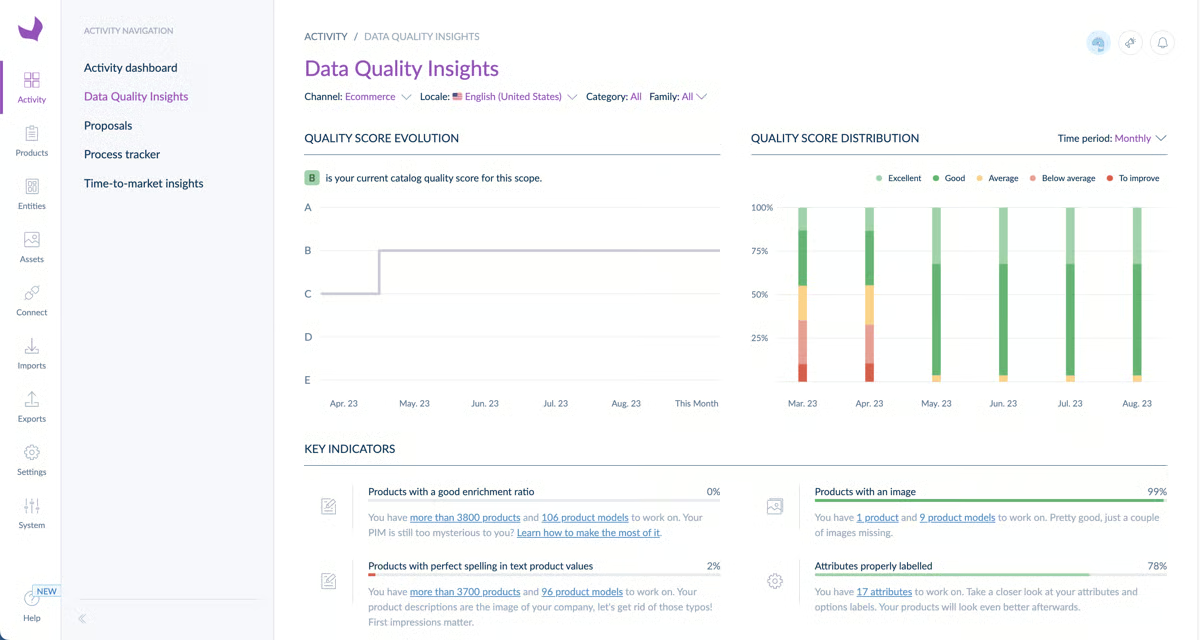
The platform’s modular architecture is another frequently noted advantage. Built on Symfony, Akeneo is designed to be extensible. Whether integrating with systems like Magento, Bynder, ERPs, or custom internal tools, users point to a healthy ecosystem of connectors and marketplace plugins. For businesses with evolving tech stacks, that adaptability plays an important role in long-term scalability.
Akeneo has also introduced AI-driven content generation features to support product enrichment workflows. Reviewers see this as a practical enhancement for scaling product descriptions and maintaining consistent messaging across catalogs, especially in high-volume retail environments.
Support and documentation are also recurring themes in feedback. Users often reference responsive customer teams, detailed documentation, and an active community forum as valuable resources during implementation and optimization. For organizations working through structured data modeling or advanced configuration, that ecosystem adds an extra layer of confidence.
While the Community Edition provides meaningful functionality, reviewers acknowledge that the Enterprise Edition expands capabilities with advanced rights management, tailored export options, and deeper governance controls. For teams operating at enterprise scale, those additions often justify the upgrade.
From the G2 reviews I read, Akeneo clearly stands out for handling complex product structures at scale. That said, teams operating at enterprise depth should expect meaningful setup time, especially when mapping intricate taxonomies or configuring advanced attribute logic. Some changes still require editing configuration files or YAML, so teams without technical resources may want to plan for developer involvement early on.
Reviewers also point out that while the Community Edition is solid, several advanced capabilities, like webhooks and enhanced reference entities, sit behind the Enterprise tier. Smaller teams or those with tighter budgets should align feature needs with plan levels upfront to ensure the investment matches their product data ambitions.
Regardless, Akeneo has been a game-changer in how I manage product information. If you are looking for a modern, flexible PIM built with managers and developers in mind, it’s worth a shot.
What I like about Akeneo PIM:
- Akeneo has a user-friendly interface that allows users to easily configure product data.
- Akeneo provides powerful APIs
What G2 users like about Akeneo PIM:
The flexibility of the product allows you to design a PIM solution that fits your unique business. Also, the documentation is great, which makes finding and understanding features, concepts, and best practices easy.
The API docs are also very well written, as they help to make Akeneo your central system that will integrate to many other systems. The Akeneo support is also amazing, very responsive, and always solves any issues.”
– Akeneo PIM review, Tiaan H.
What I dislike about Akeneo PIM:
- Based on G2 feedback, teams managing complex product hierarchies see strong value in Akeneo’s depth, but organizations rolling it out at enterprise scale should plan for a more involved setup, especially when dealing with advanced attribute logic or configurations that require technical edits.
- Reviewers also note that while the Community Edition is capable, several advanced features are reserved for the Enterprise tier, so smaller teams should map feature needs to pricing plans early to ensure the investment aligns with their growth plans.
What G2 users dislike about Akeneo PIM:
“I find that the filters and customization of the shared catalog in Akeneo PIM are very inflexible and limited.”
– Akeneo PIM review, Céline B.
Best PIM software: Frequently asked questions (FAQs)
1. What is the best PIM software for a small retail business?
Plytix Cloud PIM & DAM is one of the best PIM software options for small retail businesses because of its intuitive interface, affordable pricing, and strong product catalog organization features. It helps small teams centralize product data, manage digital assets, and distribute product information across eCommerce channels without the complexity of enterprise PIM systems.
2. What are the recommended PIM platforms for a medium-sized company?
Sales Layer PIM and Pimberly SaaS PIM & DAM are strong PIM platforms for medium-sized companies. Both provide centralized product data management, localization capabilities, and workflow automation while remaining scalable enough to support growing catalogs and multi-channel distribution.
3. What are the leading PIM solutions for managing product data?
Leading PIM solutions for product data management include Akeneo PIM, Syndigo, Pimberly SaaS PIM & DAM, Sales Layer PIM, and Quable PIM. These platforms help businesses centralize product information, manage attributes and digital assets, and distribute consistent product data across marketplaces, eCommerce sites, and partner channels.
4. What are the top rated Product Information Management apps?
Top-rated Product Information Management (PIM) apps include Akeneo PIM, Plytix Cloud PIM & DAM, Sales Layer PIM, Pimberly SaaS PIM & DAM, and Syndigo. These platforms are frequently recognized for usability, scalability, and their ability to simplify product data enrichment and multichannel distribution.
5. What are the best PIM software for eCommerce site?
The best PIM software for eCommerce sites includes Syndigo, Akeneo PIM, and Pimberly SaaS PIM & DAM. These platforms support multichannel product syndication, product content enrichment, and marketplace integrations, helping businesses maintain consistent product data across eCommerce stores and digital marketplaces.
6. What’s the best PIM tool for service industry?
Sales Layer PIM is a strong PIM tool for the service industry due to its flexible data modeling and ability to manage structured product or service information. It helps organizations maintain service catalogs, specifications, and updates across websites, portals, and digital platforms.
7. What’s the most efficient PIM system for product database management?
Akeneo PIM is widely considered one of the most efficient PIM systems for product database management. It offers robust attribute management, catalog structure control, and scalability for organizations managing large and complex product datasets.
8. What are the best PIM tools for app development teams?
The best PIM tools for app development teams include Akeneo PIM, Syndigo, and Sales Layer PIM. These platforms offer strong APIs and integration capabilities, allowing development teams to connect product data with CMS platforms, eCommerce systems, and mobile applications.
9. What’s the PIM software with best customer reviews?
Plytix Cloud PIM & DAM consistently receives strong customer reviews for its ease of use, onboarding experience, and responsive customer support. It is particularly favored by small and mid-sized businesses looking for an accessible way to centralize and manage product information.
Q10. What is the best PIM software for small retail business?
Plytix Cloud PIM & DAM is widely considered one of the best PIM software options for small retail businesses because it combines ease of use with strong catalog management capabilities. It allows small teams to centralize product data, manage images and digital assets, and distribute product information across multiple sales channels without requiring complex enterprise configurations.
Q11. What are the popular Product Information Management software options?
Popular Product Information Management software options include Akeneo PIM, Plytix Cloud PIM & DAM, Sales Layer PIM, Pimberly SaaS PIM & DAM, Syndigo, Quable PIM, and 1WorldSync. These platforms help businesses centralize product data, enrich product content, and distribute consistent information across eCommerce platforms, marketplaces, and digital channels.
Building a SaaS haven for your products
After analyzing these tools, I drew a conclusion that your needs might differ based on the nature of your product, revenue goals, team and application workflows, and customer sentiments. Before choosing a PIM tool, analyzing your current product distribution and syndication processes and exploring ways to optimize it while not hitting budget constraints is the ideal way to earn ROI from your investment. And while you’re at it, this list is here to help you identify the right use case that fits in with your business’s PIM needs.
As your applications host and store product data, learn how you can maintain them with my colleague’s analysis on the best application monitoring software.
