


If your weekly sync exists mainly to ask, “What’s the status?” the problem is structural.
In smaller teams, everyone more or less knows what’s happening. As teams grow, that shared awareness fades. Ownership needs to be defined. Approvals need to be trackable. Most importantly, status needs to live somewhere other than a conversation or memory. That’s usually when the search for the best workflow management software begins. Not because teams want another tool, but because informal coordination stops scaling.
When work lives across email, chat, spreadsheets, and standalone platforms, visibility becomes inconsistent. Teams spend time clarifying ownership, checking updates, and following up on routine approvals. That coordination overhead compounds as processes become more layered.
Workflow management software exists to reduce that friction. The right system defines how work moves from one stage to the next, automates recurring steps, and creates accountability across teams. Whether you’re managing accounting reviews, legal documentation, nonprofit operations, or cross-functional initiatives, structure reduces manual effort and improves consistency.
For this guide, I analyzed leading workflow management platforms like Slack, Asana, Smartsheet, monday Work Management, ClickUp, Wrike, Jotform Workflows, Karbon, and Kintone using G2 Data alongside feature comparisons. I assessed automation depth, customization flexibility, reporting visibility, integration support, and recurring themes in user satisfaction. I also considered how well each tool supports scaling teams and multi-step workflows.
The breakdown below focuses on platforms built for reliable execution. If you’re narrowing down the best workflow management software for your team, this comparison is designed to help you choose the system that aligns with how you actually operate.
9 best workflow management software for 2026: My top picks
- Slack: Best for team communication and integrations
Centralizes messaging, file sharing, and 2,600+ app integrations with built-in AI workflow capabilities. ($6.67/mo) - Asana: Best for intuitive project tracking
Offers multiple project views, automation rules, and seamless cross-team collaboration. ($10.99/mo) - Smartsheet: Best for spreadsheet-style project management
Combines grid, Gantt, and card views with automation in a familiar, scalable interface. ($9/mo) - monday Work Management: Best for visual workflow customization
Delivers flexible boards, robust automation, and 40+ integrations for process optimization. ($12/mo) - ClickUp: Best for all-in-one productivity
Bring tasks, documents, whiteboards, dashboards, and AI tools into one customizable workspace. ($7/mo) - Wrike: Best for comprehensive project collaboration
Flexible project organization, automation, and reporting supporting diverse team workflows. ($10/mo) - Jotform Workflows: Best for no-code workflow automation
Drag-and-drop automation builder integrated with Jotform forms, supporting 200+ app connectors. ($34/mo) - Karbon: Best for accounting practice management
Specialized, collaborative workflow and client communication designed for accounting firms. ($59/mo) - Kintone: Best for no-code app building and workflow digitization
Visual app and workflow builder with extensive integrations and collaboration tools. ($24/mo)
*These workflow management tools are top-rated in their category, according to the G2 Winter 2026 Grid Report. I’ve also included their starting pricing to make comparisons easier.
9 best workflow management tools I recommend
For me, workflow management software makes the difference between feeling on top of work and constantly chasing it. When processes aren’t defined, you end up asking for updates, clarifying ownership, and checking whether something actually moved forward.
Once I started looking closely at how these tools work, I noticed how much mental space they free up. Instead of remembering the next step or sending follow-up messages, the workflow handles it. Tasks move automatically. Approvals trigger notifications. Deadlines stay visible.
That shift is happening at scale. The global Workflow Management System market grew from $13.80 billion in 2025 to $17.54 billion in 2026. It is projected to reach USD 79.26 billion by 2032. Growth at this pace shows how quickly organizations are investing in process automation, compliance visibility, and systems that support distributed teams.
Buying dynamics are shifting, too. G2’s 2025 Buyer Behavior Report shows buying teams are getting smaller, while 57% of organizations expect to increase software spending this year. Smaller teams with higher expectations can’t afford coordination overhead. They need workflows that run without constant supervision.
As I reviewed these tools, I focused on what actually improves day-to-day execution: automation rules, clear task dependencies, real-time dashboards, and integrations that prevent workflows from breaking across systems. In G2 reviews, users consistently point to these features as the reason they save time and avoid bottlenecks.
Once workflows are centralized and automated, it’s hard to go back to manual coordination. Work moves with less friction. You spend less time tracking progress and more time making it.
How did I find and evaluate the best workflow management software?
To build this list, I started with the G2 Winter 2026 Grid Reports for workflow management software to identify platforms that consistently perform well across customer satisfaction and market presence. From there, I reviewed a broad set of verified G2 user reviews to understand how these tools are used in day-to-day operations.
I analyzed how each platform supports structured, repeatable workflows in real-world scenarios, including accounting close cycles, legal approvals, onboarding processes, cross-functional coordination, and recurring operational tasks. Some tools focus more on collaboration and communication, while others prioritize automation, reporting, or industry-specific workflows. Each product was evaluated based on how effectively it supports execution within its intended use case.
To validate patterns in user feedback, I used AI-assisted analysis to identify recurring themes across G2 reviews, focusing on automation reliability, task routing, reporting visibility, integration flexibility, ease of onboarding, and scalability. The tools that made this list consistently reduced manual coordination, improved visibility, and maintained performance as workflows scaled.
The screenshots featured in this article may include a mix of G2 product profile page screenshots and vendor website images.
What makes workflow management software worth it: My perspective
As I went through G2 reviews and compared workflow management tools side by side, a few clear patterns stood out. Teams rarely complain about a lack of features. They complain when workflows feel heavy, unclear, or overly manual. Automation that actually works, visibility into progress, and flexibility to adapt processes matter far more than feature volume.
Those themes shaped how I evaluated each workflow management platform in this list.
- Automation depth and reliability: Workflow software should move work forward without constant nudges. I prioritized tools that support rule-based task routing, recurring processes, approval flows, and dependencies that function consistently under real workloads. Automation only adds value when it reduces follow-ups instead of creating new edge cases.
- Workflow customization and flexibility: No two teams run processes the same way. I gave more weight to platforms that allow you to customize statuses, fields, permissions, and workflow logic without heavy configuration. Tools that force rigid structures tend to break down as processes evolve.
- Governance and permission controls: As teams scale, access control becomes critical. I paid attention to role-based permissions, approval hierarchies, audit trails, SSO support, and administrative visibility. Strong governance ensures workflows remain compliant, secure, and consistent across departments rather than becoming fragmented over time.
- Visibility and reporting clarity: Workflows fail quietly when you can’t see where they stall. I looked closely at dashboards, workload views, bottleneck indicators, and reporting accuracy. Strong visibility helps you identify delays before they compound.
- Integration ecosystem: Workflow management rarely happens in isolation. I evaluated how well each platform connects with CRM systems, accounting software, communication tools, and document management platforms. When integrations are weak, workflows fragment across tools.
- Ease of adoption and usability: Even the most advanced system fails if teams resist using it. I paid attention to onboarding feedback, interface clarity, and how intuitive it feels to build and maintain workflows over time.
- Scalability and long-term performance: Handling a small team is one thing. Supporting layered processes across departments is another. I prioritized platforms that maintain performance and usability as usage grows.
In total, I evaluated more than 15 workflow and project management tools while researching this article, and nine solutions made the final list. These platforms consistently performed well across G2 Grid positioning, user satisfaction, and real-world workflow use cases.
The list below contains genuine user reviews from the Workflow Management Software category. To qualify for inclusion in the Workflow Management category, a product must:
- Allow for the creation of logical rules and rule management
- Provide drag-and-drop features to create workflows
- Enable automation of tasks external to the workflow management software
- Manage dependencies between tasks and workflows
- Alert and notify users or managers based on predefined rules
- Allow users to create forms
*This data was pulled from G2 in 2026. Some reviews may have been edited for clarity.
1. Slack: Best for team communication and integrations
When I first started using Slack, I treated it as a messaging tool. Over time, it became the place where most work actually moved. Project updates, quick approvals, shared files, and status checks were moved into structured channels, away from scattered email threads. That shift didn’t just reduce back-and-forth,
it made ownership and accountability more visible.
Slack’s channel system is what makes it operationally useful. You organize conversations by team, client, or initiative, and threaded replies keep side discussions from derailing the main flow. Instead of asking for updates, you can review the decision timeline in one searchable place. For communication-driven workflows, that transparency reduces friction and speeds up alignment.
Where Slack becomes more powerful is through its integration ecosystem. With more than 2,600 app connections, tools like Jira, Salesforce, Google Workspace, Zoom, and accounting platforms feed updates directly into relevant channels. Task changes, CRM updates, ticket alerts, and document edits are automatically surfaced. That real-time signal flow reduces context switching and keeps workflows connected across systems.
The Workflow Builder and Slackbot add lightweight automation. You can create approval requests, onboarding steps, recurring reminders, and structured intake processes without code. Once configured, those workflows run consistently in the background. G2 reviewers frequently highlight automation and integrations as the features that improve coordination and reduce manual follow-ups.
Slack’s search capabilities are another operational advantage. Filtering by person, date, channel, or file makes past decisions retrievable rather than buried. Built-in huddles and voice/video calls also allow quick alignment without leaving the workspace, which helps maintain momentum. Combined with enterprise-grade security, compliance certifications, SSO, and granular admin controls on higher plans, Slack scales from small teams to regulated environments.
Slack also demonstrates strong performance across G2 satisfaction metrics. It holds a 4.5 out of 5 rating based on 36,845+ reviews. 98% of users rate it 4 or 5 stars, and 94% say they would recommend it. Feature-level satisfaction remains high, with ease of use and ease of setup both rated at 95%, meets requirements at 94%, ease of admin at 93%, and quality of support at 92%. These scores reinforce its reliability for teams managing communication-heavy workflows.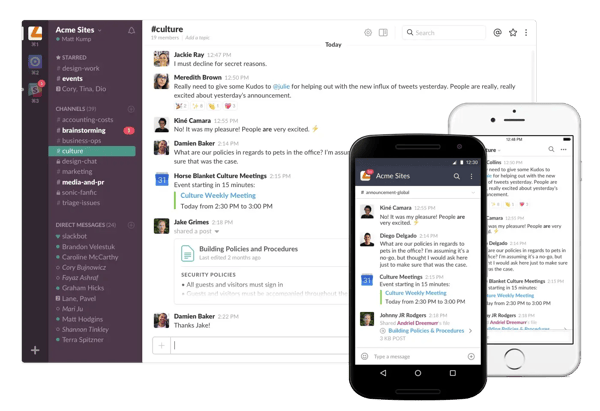
That said, Slack does require thoughtful channel structure and notification management. Several G2 reviewers mention that without clear governance, channels can multiply quickly and notifications can become distracting. Teams that define naming conventions and set notification preferences early tend to maintain clarity.
Plan tiers also shape usability. The free plan limits searchable message history to 90 days, which some users note can restrict long-term reference and compliance needs. Organizations that rely heavily on historical records often upgrade to paid tiers for extended retention and administrative controls.
When configured with a team’s needs in mind, Slack supports structured communication at scale. It connects tools, automates coordination, and centralizes context in a way that reduces operational drag. For teams that run on collaboration, it remains one of the most reliable workflow foundations available.
What I like about Slack:
- Communication, tool integrations, and workflow updates live in one centralized workspace, reducing context switching and improving cross-team visibility.
- Workflow Builder and automation features help standardize approvals, requests, and recurring tasks, making everyday coordination more consistent.
What G2 users like about Slack:
“The best thing about Slack is how it just works for our team. The learning curve was practically zero; we rolled it out, and people were using it effectively that same afternoon. It’s incredibly intuitive. What we love in our day-to-day use are the simple things that have a huge impact. We’ve connected all our other critical tools, such as Asana, Google Drive, and Postman, directly into Slack. I absolutely love that we have this huge list of apps we can connect to. It has turned Slack into our command center, which helps us keep our entire workflow in one place instead of juggling ten different tabs.”
– Slack review, Raiti Gaspar R.
What I dislike about Slack:
- Without a clear channel structure and notification management, Slack can become noisy as teams scale, making it harder to stay focused. G2 reviewers frequently mention notification volume as a challenge in larger teams, especially when channels and alerts are not configured intentionally. Teams that define channel structures and set notification preferences early tend to maintain greater clarity.
- The free plan’s 90-day message history limit can restrict long-term visibility into past conversations and decisions. G2 reviewers note that teams relying on Slack as a knowledge base often require paid plans to maintain access to historical context and ensure continuity.
What G2 users dislike about Slack:
“Notifications can get overwhelming in busy workspaces, and it’s easy to miss important messages. With too many channels, things can feel noisy, and message history sometimes becomes hard to track over time.”
– Slack review, Harsh S.
2. Asana: Best for intuitive project tracking
I use Asana regularly. It took me some time to understand how projects, tasks, subtasks, sections, and views fit together. But once that clicked, my work stopped feeling scattered. Everything had a defined owner, a deadline, and a visible status. That structure is what makes Asana an effective project management software.
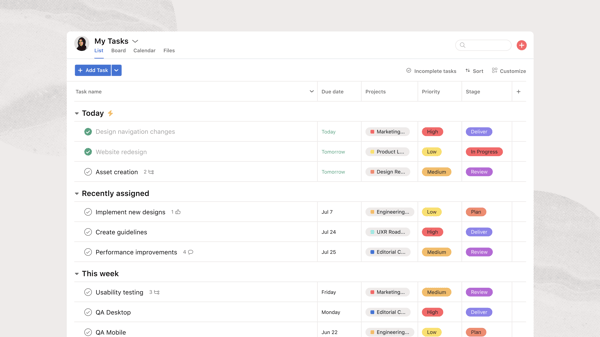
The biggest shift for me was structured task tracking and ownership clarity. Instead of wondering what was in progress or who was responsible, I could immediately understand ownership, progress, and deadlines. Timeline and List views made sequencing obvious. According to G2 Data, users consistently highlight Asana’s clarity around ownership and deadline tracking as a core strength, supported by a 91% score for meeting requirements.
Automation supports workflows without adding unnecessary complexity. I use rules to move tasks between stages and automatically assign work, reducing manual follow-ups. Based on G2 reviews, teams frequently cite automation as a way to maintain consistency across recurring workflows. This makes it easier to manage processes without constantly intervening.
Collaboration stays attached to the work itself. Comments, attachments, and updates live within each task, preventing context from drifting into email threads. G2 reviewers often describe this centralized communication as a reason accountability improves across teams. It keeps discussions tied directly to execution.
Asana also scales across departments. You can run simple task lists or multi-phase initiatives within the same workspace. According to G2 Data, teams appreciate this flexibility as workflows grow more complex, with 96% of users rating it 4 or 5 stars and 91% likely to recommend it. This makes it suitable for both small teams and large organizations.
Asana’s multiple project views also make it easier for teams to manage work in the format that suits them best. List, Board, Calendar, and Timeline views allow the same work to be organized differently depending on whether a team is tracking deadlines, sequencing deliverables, or managing daily execution. This flexibility helps different stakeholders work from the same system without duplicating projects. For cross-functional teams, that makes planning more practical across varied workflows.
Ease of use supports adoption across teams with different levels of experience. The interface stays structured while offering multiple views, which helps teams organize work without heavy customization. G2 Data reflects this with a 90% ease of use score and an overall rating of 4.4 out of 5. Teams can get started quickly without extensive configuration.
According to G2 reviews and my experience, new users may initially find that the project, tasks, and view structure require some adjustment. This is more noticeable for teams adopting Asana across multiple workflows. That initial setup reflects the platform’s ability to support organized project tracking, dependencies, and scalable workflows once adopted.
Based on G2 feedback, advanced reporting and portfolio-level analytics are available in higher-tier plans, which teams may need to evaluate as their reporting needs grow. This is more relevant for organizations managing multiple projects or requiring cross-team visibility into performance and progress. Teams focused primarily on task execution may not encounter this limitation early on. The tiered structure allows teams to begin with core task management and gradually expand into more advanced planning and reporting capabilities. As workflows scale, this flexibility supports a more organized transition into higher-level oversight.
Once I adjusted to how Asana structures work processes, it became difficult to return to unstructured systems. It enforces clarity without excessive customization. That balance of discipline and usability is what keeps it highly rated across industries.
What I like about Asana:
- Clear task ownership and visibility make it easy to track progress, assign responsibility, and manage deadlines without confusion. G2 reviewers consistently highlight this clarity as a core strength for keeping teams aligned.
- Built-in automation and structured workflows help reduce manual follow-ups and maintain consistency across recurring processes. Users often mention that these features improve coordination as projects scale.
What G2 users like about Asana:
“I really like how Asana helps manage my workload and create dashboards efficiently. It makes work clearer and more visible, which helps me see who is busy and where work might slip, so I can plan better and avoid overload. The dashboards give me a quick snapshot of projects, and the goal management features help manage everyday tasks in relation to the bigger picture. I also appreciate how it assists in setting deadlines and assigning tasks to create ownership and enables real-time tracking of projects.”
– Asana review, Sammy K.
What I dislike about Asana:
- The learning curve can feel steep at first, especially with multiple views and configuration options. The time you spend figuring it out translates directly into value, since the platform gives you the flexibility to structure workflows, track dependencies, and manage work at scale with clarity.
- Based on patterns across G2 reviews, reporting and dashboard customization can feel limited without additional setup or higher-tier plans. For teams primarily focused on structured task tracking and workflow visibility, the built-in reporting is often sufficient.
What G2 users dislike about Asana:
“Asana is very powerful, but that flexibility can come with a learning curve if workflows and standards aren’t clearly defined upfront. Without a good structure, teams can overcomplicate task setups or use them inconsistently. That said, once templates and governance are in place, Asana becomes very efficient and easy to use.”
– Asana review, Andres A.
3. Smartsheet: Best for spreadsheet-style project management
If you’ve spent years working in Excel or Google Sheets, Smartsheet feels immediately familiar.
Its grid layout mirrors spreadsheet logic, which lowers the learning barrier for operations, finance, and PMO teams already comfortable working in rows and columns. According to G2 Data, users consistently highlight this familiarity, supported by high ease of use scores and an overall rating of 4.4 out of 5.
Smartsheet goes beyond the comfort of being similar to a spreadsheet. It builds structured project and portfolio management directly on top of that grid. Dependencies, milestones, cross-sheet rollups, and Gantt timelines sit alongside rows of data without forcing teams to abandon the format they already understand. Based on G2 Data, users often highlight this ability to evolve from simple task tracking to full portfolio oversight as a key strength, reflected in an 88% score for meeting requirements.
Where the platform becomes especially powerful is in visibility. Dashboards pull metrics from multiple sheets into a single view, allowing leadership teams to monitor KPIs without requesting manual updates. G2 reviewers frequently reference portfolio-level reporting as a reason Smartsheet scales well for PMOs and enterprise environments, with 89% ease of doing business and strong reporting satisfaction.
Automation reinforces that structure. Visual, no-code workflow builders support conditional logic, approval chains, and recurring processes that reduce manual coordination. Combined with intake forms that feed directly into sheets, Smartsheet supports standardized processes for procurement, onboarding, and request-heavy workflows, supported by 86% ease of setup.
Collaboration is tightly embedded within the work itself. In-row comments, proofing tools, file attachments, and granular permissions keep discussions and documentation connected to the data. For regulated industries, compliance certifications and advanced administrative controls further support governance requirements, contributing to 88% ease of admin satisfaction.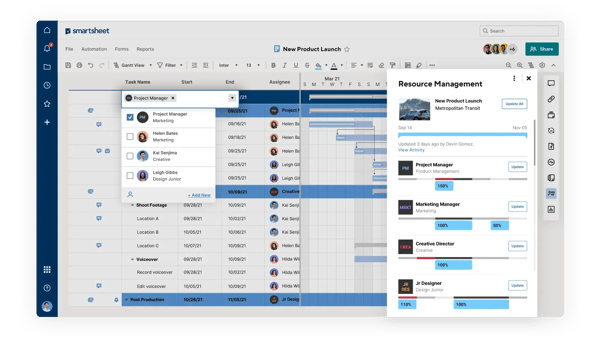
Smartsheet also supports enterprise-scale governance and control. Administrative capabilities such as user permissions, audit logs, and compliance features help organizations manage large, distributed teams with confidence. According to G2 Data, users in enterprise environments frequently highlight these controls as essential for maintaining operational consistency and security at scale, with 86% quality of support.
That said, G2 reviews note that the depth of dashboards and automation workflows can require onboarding or structured setup time. This depth reflects the platform’s ability to support complex, process-driven environments, giving teams the flexibility to build detailed workflows and reporting structures as they scale.
Mobile functionality is another area mentioned in user feedback. Complex configuration and reporting tasks are typically better handled through the desktop experience, although G2 users frequently cite it useful for updates and approvals.
Smartsheet works best for teams that think in structured processes and need enterprise-level visibility layered onto familiar tools. Its ability to bridge spreadsheet logic with scalable workflow control is what keeps it competitive in process-driven environments.
What I like about Smartsheet:
- The spreadsheet-style interface feels familiar, making it easier for teams already comfortable with Excel or Google Sheets to get started, while still supporting advanced workflow features such as dependencies, Gantt charts, dashboards, and automation.
- Strong reporting and portfolio-level visibility allow teams to track performance across multiple projects, making it especially effective for process-driven teams and organizations managing work at scale.
What G2 users like about Smartsheet:
“Ease of the functionalities. Smartsheet offers a wide range of tools to work efficiently. There are a lot of features I haven’t fully discovered, yet everything feels easy and straightforward to use. The best way to describe it is Excel on steroids, made easier to operate. I’m using Smartsheet on a daily basis.”
– Smartsheet review, Niels H.
What I dislike about Smartsheet:
- The depth of dashboards and automation workflows can require onboarding or structured setup time. Teams that invest this effort gain access to highly customizable workflows and reporting capabilities that support complex, process-driven environments at scale.
- Mobile functionality is another area mentioned in user feedback. Complex configuration and reporting tasks are typically better handled through the desktop experience, although G2 users frequently cite it useful for updates and approvals.
What G2 users dislike about Smartsheet:
“The only consistent pain point is that some of the more advanced features sit behind a learning curve that slows down adoption for team members who aren’t as tech-comfortable. When scaling cross-department projects, I occasionally have to simplify workflows just to keep everyone aligned.”
– Smartsheet review, Lewis D.
If pricing flexibility is a priority, it helps to explore alternatives that offer robust features at no cost. Explore free project management software to compare options designed for budget-conscious teams.
4. monday Work Management: Best for visual workflow customization
monday Work Management stands out as a flexible platform built for teams that want to design workflows around how they actually work.
Marketing, product, operations, and cross-functional teams adopt it for its ability to bring structure and visibility to complex processes without adding rigidity. According to G2 Data, it holds a 4.7 out of 5 rating, with 99% of users rating it 4 or 5 stars and 95% likely to recommend it. This combination of usability and adaptability is a key reason it sees strong adoption across teams managing evolving workflows.
At its core, monday is designed for visual workflow management. Teams across marketing, product, and operations adopt it for its ability to simplify complex workflows into structured, trackable boards. Customizable boards, color-coded statuses, and drag-and-drop workflows make it easy to understand work at a glance. It is also recognized for high satisfaction across ease of use, flexibility, and overall usability in the work management category.
Customization is where monday stands out. Teams can tailor columns, automations, dashboards, and permissions to match specific workflows rather than adapting to rigid structures. Based on G2 user feedback, this level of control makes it suitable for marketing, product, HR, sales, and operations teams as workflows evolve over time.
Multiple views enhance usability across roles. Kanban, Timeline (Gantt), Calendar, Workload, Map, and Chart views allow different stakeholders to work from the same system without duplicating workflows. According to G2 Data, this adaptability supports cross-functional collaboration without duplicating projects, which helps teams stay aligned without increasing operational overhead.
Automation plays a central role in reducing manual coordination. Rule-based triggers handle status updates, assignments, deadline reminders, and recurring tasks. The addition of AI-powered project management features like monday sidekick further supports workflow suggestions and content generation, which users increasingly reference in feedback around productivity gains.
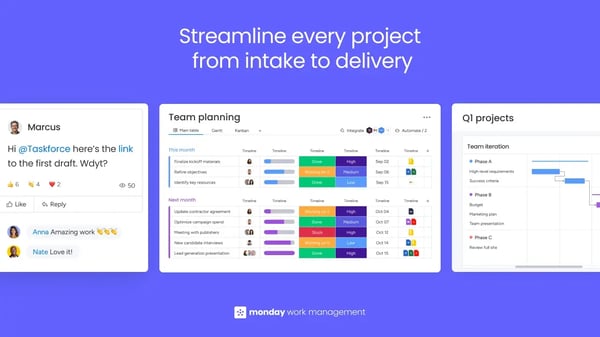
Reporting and dashboards provide high-level oversight. Custom widgets, time tracking, workload management, and formula columns allow teams to track performance, workload distribution, and timelines within the platform. G2 reviews frequently highlight dashboards as valuable for leadership visibility, especially when managing multiple teams or projects.
monday also integrates with numerous popular tools like Adobe Acrobat, Canva, ChatGPT, and offers API access, which allows workflows to extend beyond the platform. Guest access and granular permissions make it suitable for client collaboration and cross-team coordination, particularly for teams working with external stakeholders.
That said, G2 reviews note that extensive customization can require thoughtful setup. Teams may experience a learning curve during initial configuration, especially when building complex, cross-department workflows. This complexity reflects the platform’s flexibility, allowing organizations to design workflows that closely match their operational needs. Once configured, teams benefit from highly tailored systems that improve efficiency and consistency across projects.
Pricing is another consideration. Advanced reporting, high-volume automation limits, and enterprise-grade controls require higher-tier plans, which growing teams should evaluate carefully. This tiered structure allows organizations to start with core capabilities and expand into more advanced features as their workflow needs become more complex. Teams that prioritize visual clarity and deep customization often find the additional investment aligned with the value they gain over time.
Overall, monday works best for teams that want visual control over workflows without sacrificing customization depth. Its balance of usability and flexibility is a primary driver of its strong adoption across industries.
What I like about monday Work Management:
- The visual interface makes it easy to understand workflows at a glance, with color-coded boards, drag-and-drop functionality, and clear status tracking that help teams stay aligned without constant check-ins. G2 reviewers frequently highlight ease of use as a key reason teams adopt it quickly.
- The level of customization allows teams to tailor workflows, automations, and dashboards to their exact processes, supporting different departments without forcing a one-size-fits-all structure. Users often mention this flexibility as a major advantage for scaling workflows across teams.
What G2 users like about monday Work Management:
“My team and I have been using monday for over 5 years. From day one, it has been our workflow, resource tool, and more. It has continually developed. The team at monday has always been supportive in training and responsive when we pushed it to the limit. Easy to use, spreading responsibilities by reducing bottlenecks, QC, real-time retainer, and out-of-scope financial management, and file delivery were just the tip of the iceberg of what we could do. monday was used every hour of every day for and by every person.”
– monday Work Management review, Rob C.
What I dislike about monday Work Management:
- According to G2 reviews, building complex, cross-team workflows can require thoughtful setup and configuration time, particularly for organizations scaling processes across departments. This setup reflects the platform’s flexibility, allowing teams to design workflows that closely match their operational needs and improve consistency as they grow.
- Based on G2 user feedback, advanced reporting, automation limits, and enterprise controls are tied to higher-tier plans, which growing teams may need to evaluate carefully. This tiered structure allows teams to start with core features and expand into more advanced capabilities as their workflow complexity and reporting needs increase.
What G2 users dislike about monday Work Management:
“If I had to pick something, it’s that there’s a bit of a learning curve at first with figuring out the different views (tables vs. timeline, etc) but once you get things set up, it’s smooth and well worth the effort.”
– monday Work Management review, Justin B.
5. ClickUp: Best for all-in-one productivity
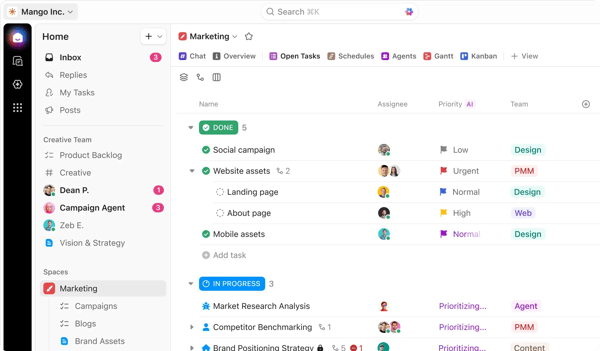
For teams that want everything in one place, ClickUp is god sent. Tasks, documents, goals, dashboards, chat, whiteboards, and automation live inside a single hierarchical structure. According to G2 Data, ClickUp holds a 4.7 out of 5 rating based on 10,666 user reviews, with 99% of users rating it 4 or 5 stars and 95% likely to recommend it. Users frequently describe it as a platform that replaces multiple tools rather than supplements them, which makes it especially appealing for teams looking to consolidate their tech stack.
Its hierarchical system workspaces to spaces to folders to lists to tasks — allows teams to structure work at different levels of complexity. This flexibility makes it suitable for both simple task tracking and layered project management. Based on G2 Data, it scores 91% for meeting requirements, reinforcing how well it supports diverse workflows. Teams can adapt the structure to match their processes rather than forcing work into predefined systems.
ClickUp’s multiple project views add to that flexibility. Teams can switch between List, Board, Calendar, Gantt, Timeline, Workload, and even Mind Map views without recreating workflows. This versatility helps cross-functional teams visualize the same work in ways that match their roles. According to G2 Data, its 92% ease of doing business score reflects how effectively teams collaborate without duplicating effort.
Automation is another major strength. Rule-based triggers, recurring workflows, and task routing reduce repetitive coordination. The addition of ClickUp Brain introduces AI-powered task summarization and workflow suggestions, which users increasingly reference in feedback around productivity gains. These capabilities help teams maintain consistency and reduce manual intervention across workflows.
ClickUp also integrates documentation directly into execution. Built-in Docs, wiki-style pages, and whiteboards keep knowledge connected to tasks rather than stored in separate systems. Combined with 1,000+ integrations and a public API, the platform supports teams that want centralized execution without sacrificing connectivity. This ensures that teams can manage both work and knowledge without switching between tools.
Pricing is frequently mentioned as a competitive advantage. Compared to other platforms with similar feature depth, ClickUp’s lower-tier plans offer substantial functionality. According to G2 reviews, this accessibility is a key reason startups and growing teams adopt the platform early. It allows teams to scale usage without immediate pressure to upgrade.
That said, G2 reviews consistently mention a learning curve. The platform’s depth can feel overwhelming during initial setup, particularly for teams without clearly defined workflows. That complexity comes from the sheer range of customization options available, which gives teams the flexibility to build tailored systems that support both simple task management and more advanced operational workflows as they grow.
Performance is another theme noted in user feedback. As workspaces grow in size and complexity, some users report slower load times or a denser interface. That trade-off reflects how much work, documentation, and automation the platform can centralize in one place, which is part of what makes it valuable for teams managing complex workflows at scale.
Overall, ClickUp works best for teams that want maximum flexibility in a single system. According to G2 Data, its combination of customization, automation, integrations, and pricing makes it especially attractive for teams willing to trade simplicity for depth. It remains a strong choice for organizations that prioritize configurability and consolidation.
What I like about ClickUp:
- All-in-one workspace that combines tasks, docs, dashboards, automation, and collaboration in a single, highly customizable system.
- Flexible views, deep automation, and competitive pricing make it well-suited for teams that want feature breadth without managing multiple tools.
What G2 users like about ClickUp:
“What I love most about ClickUp is how it replaces multiple tools in one place. No more switching between multiple apps. It offers an unparalleled number of features compared to other software. It’s also highly customizable to fit any workflow thanks to features like multiple views that let me set up projects exactly how I need, dashboards that give me a clear view of reports and stats, and automations that save me hours by handling repetitive tasks.”
– ClickUp review, Marco S.
What I dislike about ClickUp:
- According to G2 reviews, the platform’s extensive feature set can make navigation feel cluttered, especially for teams that prefer streamlined, minimal interfaces.
- Based on G2 user feedback, frequent feature updates and interface changes may require teams to periodically adjust workflows, which can impact consistency for highly standardized environments.
What G2 users dislike about ClickUp:
“It’s so powerful and customizable that the layout can feel a little overwhelming if I’m moving fast or switching between spaces. There are moments where I have to stop and think, “Okay… where did I put that?” or “Which view am I in right now?”
It’s not a deal‑breaker; it just takes a minute to reorient because there are so many features stacked on top of each other. Once I’m back on track, it’s fine, but that initial “wait, what am I looking at?” definitely happens.”
– ClickUp review, Lacey E.
6. Wrike: Best for comprehensive project collaboration
When I looked at Wrike through the lens of cross-functional coordination, it became clear why it shows up in organizations where projects cross team lines. Marketing leans on design, operations on finance, and IT supports the rest. In these settings, a checklist isn’t enough, and teams need a structure that holds up across departments. Wrike’s folder and project hierarchy provide that by organizing initiatives, ownership, deadlines, and dependencies in one place. That layered setup is why teams rely on it when coordination goes beyond a single group.
Once work is structured, visibility becomes actionable across teams. Wrike supports this with multiple views like Gantt charts, workload dashboards, and Kanban boards, which allow managers to track dependencies, timelines, and resource allocation in one place. Managers running campaigns or launches can see how tasks connect and where timelines shift, which helps prevent bottlenecks early. Many users point to Gantt visibility and workload tracking as key reasons they choose Wrike for managing complex, cross-functional initiatives, supported by an 88% score for meeting requirements.
Teams can also shape workflows around how they already work. Custom statuses, approval stages, and routing rules let teams reflect real internal processes instead of adapting to rigid systems. This level of customization makes it easier to align workflows with service cycles, review chains, and layered approvals across departments. For organizations with complex operational flows, this flexibility supports both structure and adaptability as processes evolve.
As workflows take shape, automation reinforces consistency. Recurring tasks, rule-based triggers, and automated notifications cut down on manual reminders and ensure processes move forward without constant oversight. Teams managing repeatable processes, such as onboarding, campaign rollouts, or compliance checks, rely on this to maintain consistency. When automation is configured effectively, coordination shifts from manual follow-ups to system-driven execution.
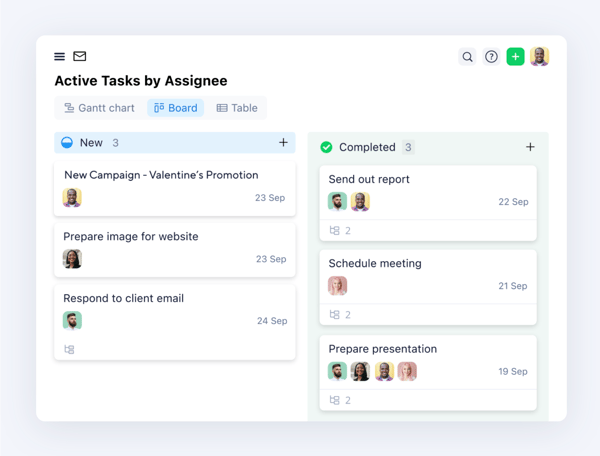
With structure and automation in place, resource management becomes more controlled. Wrike lets managers assign work based on team capacity, balance workloads across projects, and make adjustments before bottlenecks affect delivery. According to G2 Data, it scores 88% for ease of doing business, which reflects how effectively teams coordinate planning across functions. This capability supports better decision-making around workload distribution rather than just tracking progress.
Collaboration stays anchored to the work. Real-time updates, file attachments, threaded comments, and version tracking keep discussions within each task or project, which helps maintain context across teams. Instead of scattering communication across tools, teams keep everything centralized within the workflow. Many users also highlight responsive onboarding support, supported by an 88% quality of support score.
Wrike also supports integrations and enterprise governance. Connections with tools like Salesforce, Slack, and Microsoft Teams allow workflows to extend across systems, while permissions, audit trails, and administrative controls support secure operations. According to G2 Data, it holds an 85% ease of admin score, which reflects its ability to manage structured workflows at scale across large teams.
That depth comes with a learning curve. Users frequently mention that Wrike’s interface can feel complex at first, especially when navigating multiple views, custom fields, and layered workflows. This complexity reflects the platform’s ability to support highly structured and customizable workflows, giving teams the control needed to manage cross-functional processes once they are fully set up.
Pricing is another consideration. Advanced features, enterprise-grade controls, and higher usage limits are tied to premium plans, which organizations may need to evaluate as they scale. This structure allows teams to start with core capabilities and expand into more advanced functionality as their workflow requirements grow.
For teams that treat workflow as operational infrastructure rather than simple task tracking, Wrike offers control that scales. In cross-functional environments where structure, visibility, and automation need to work together, it provides a system that supports disciplined execution across the organization.
What I like about Wrike:
- The structured hierarchy combined with Gantt charts and workload views makes cross-team coordination more predictable, especially when managing dependencies across multiple teams and timelines. This setup helps teams maintain clarity as projects become more layered and interconnected.
- Deep workflow customization and automation allow teams to reflect real internal processes instead of reshaping operations around the tool. This flexibility supports complex approval chains, routing logic, and repeatable workflows across departments.
What G2 users like about Wrike:
“One thing I’ve increasingly appreciated is how well Wrike supports cross-functional collaboration at scale. As projects have grown more complex, the ability to structure work using folders, spaces, and custom fields has made it much easier to keep visibility without losing control. Reporting and dashboards have also become more valuable over time. Once properly set up, they provide a clear, real-time view of progress and bottlenecks, which is especially useful for stakeholder updates.”
– Wrike review, Shrey K.
What G2 users dislike about Wrike:
- According to G2 reviews, the platform’s depth can create a learning curve during initial setup, particularly for teams without clearly defined workflows. This complexity reflects its ability to support structured, cross-functional processes, which becomes more valuable as teams scale.
- Based on user feedback, advanced features, enterprise-grade controls, and higher usage limits are tied to premium plans, which organizations may need to evaluate as they grow. This structure aligns with Wrike’s focus on supporting more complex workflows as operational needs expand.
What G2 users dislike about Wrike:
“I’d say the onboarding experience can feel a bit overwhelming at first. The platform is extremely powerful, but that also means there’s a learning curve, especially when you start working with complex automations, custom fields, and advanced workflows. It takes time (and sometimes trial and error) to fully understand how everything connects. That said, once you get past the initial setup phase, Wrike becomes a very robust and flexible project management tool.”
– Wrike review, Jagan Kumar T.
7. Jotform Workflows: Best for no-code workflow automation
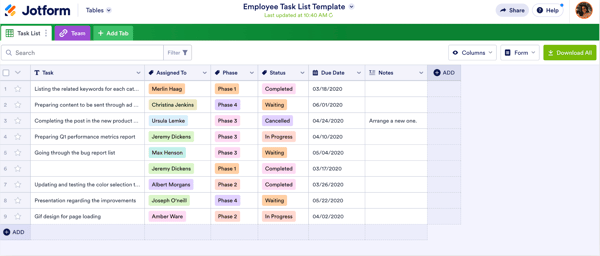
As I reviewed Jotform Workflows, it became clear that it makes the most sense in environments where work starts with a form. Intake requests, approvals, payments, feedback submissions, and onboarding documents — these are often handled manually or across disconnected tools. Jotform Workflows connects those submissions directly to automated workflows. Instead of checking inboxes and forwarding requests, teams can route, approve, and track processes automatically from the moment a form is submitted.
Its visual drag-and-drop builder keeps automation accessible. Teams can define conditional logic, approval chains, notifications, and routing rules without writing code. According to G2 Data, Jotform Workflows scores 89% for ease of use and 88% for ease of setup, reinforcing its accessibility for non-technical teams. That makes it particularly attractive to operations, HR, nonprofit, and education teams managing structured requests without engineering support.
Integration flexibility strengthens its utility. Jotform Workflows connects with over 1000 tools, including Google Drive, Slack, Airtable, CRMs, and payment gateways. Form data can automatically move into other systems, trigger notifications, or initiate follow-up tasks. This makes it useful not just for collecting information, but for turning submissions into action.
Pre-built templates accelerate setup. Teams can start with approval workflows, order processing flows, or feedback routing templates instead of building from scratch. That reduces implementation time and helps organizations quickly standardize recurring processes. For teams looking to move fast, templates remove friction.
Real-time tracking and notifications add accountability. Managers can monitor workflow progress through the Jotform Workflows Inbox, email alerts, or the mobile app. Instead of chasing updates, stakeholders can see where a request sits and who owns the next step. This visibility helps reduce bottlenecks in repetitive approval-based workflows.
Its biggest strength is accessibility. Jotform Workflows is included with Jotform Workflows accounts, including the free tier. That makes automation available to teams that may not have a budget for dedicated workflow platforms. For small to mid-sized businesses already using Jotform for form creation, extending into workflow automation feels like a natural progression rather than an additional system.
While Jotform Workflows offers a generous free tier, pricing can scale as submission volumes increase, especially for teams requiring higher storage limits, advanced features, or large-scale usage. G2 reviewers indicate that costs can rise as workflows expand. For teams with predictable submission volumes or smaller operational needs, this remains manageable. For growing organizations, the platform still provides flexibility to scale usage alongside workflow demands.
As forms become more complex, managing advanced logic, layered configurations, and design flexibility requires more structured setup. G2 reviewers indicate that highly customized workflows can take time to build and refine. For teams focused on structured, form-driven processes, this aligns with the level of control the platform provides. With thoughtful setup, Jotform Workflows continues to support scalable workflow automation while keeping implementation accessible without engineering resources.
For businesses looking to automate approvals, requests, and structured submissions quickly, Jotform Workflows provides an accessible entry point into workflow automation without requiring engineering support.
What I like about Jotform Workflows:
- The visual, drag-and-drop builder makes it easy to turn form submissions into structured approval flows without relying on developers.
- It fits naturally into teams already using Jotform Workflows, extending simple data collection into automated routing, notifications, and task coordination.
What users like about Jotform Workflows:
“The drag-and-drop modular form entries are incredibly easy to use and cover most basic needs for any form. Adding your own graphics and small features is straightforward, enhancing the quality of the final product. The free version provides full access to features, though it limits the number of forms you can use.”
– Jotfrom review, Erik R
What I dislike about Jotform Workflows:
- According to G2 reviews, pricing can increase as submission volumes, storage needs, and advanced feature usage grow, which organizations may need to evaluate as workflows scale. This structure aligns with Jotform Workflows’ flexibility to support higher-volume, form-driven processes over time.
- Based on user feedback, managing advanced logic and layered configurations can require more structured setup for highly customized forms. This complexity reflects the level of control the platform provides as workflows become more detailed.
What users dislike about Jotform Workflows:
“Sometimes the pricing can feel a bit high as usage grows, and the free plan has limitations on submissions and storage. Also, very complex forms with heavy logic can occasionally feel slow to load, so performance and pricing flexibility could be improved.”
– Jotform Workflows review, Priyanshu S
8. Karbon: Best for accounting practice management
When evaluating Karbon, I saw that it’s less a general workflow tool and more a practice management system built specifically for accounting, bookkeeping, and advisory firms.
It centralizes client communication, task management, recurring compliance work, and time tracking into one connected system. Instead of managing deadlines across spreadsheets, inboxes, and disconnected tools, firms run client engagements through a structured workflow environment built around accounting processes.
That industry alignment is why Karbon is recognized as a Leader in Accounting Practice Management on G2. That category relevance matters here because accounting practice management is fundamentally workflow-driven. Tax cycles, audits, onboarding, payroll, and compliance reporting rely on repeatable, deadline-sensitive workflows. Karbon’s positioning in that category reinforces its strength as a workflow system purpose-built for that operational model. According to G2 Data, 99% of users rate it 4 or 5 stars, highlighting strong satisfaction within its core audience.
One of Karbon’s most distinctive strengths is its integrated email system. Client emails, shared inboxes, and internal discussions live directly inside workflow items. Instead of relying on personal inboxes, conversations are linked to tasks and engagements. G2 reviewers frequently highlight this integration because it keeps accountability visible across the firm and reduces the risk of communication gaps.
Workflow automation supports recurring accounting work. Firms can build repeatable templates for tax prep, audits, advisory cycles, and onboarding processes. Tasks can be auto-assigned, scheduled, and tracked with defined statuses and reminders. This structure reduces manual follow-ups and missed deadlines. G2 feedback consistently points to effective task management and workflow standardization as core strengths.
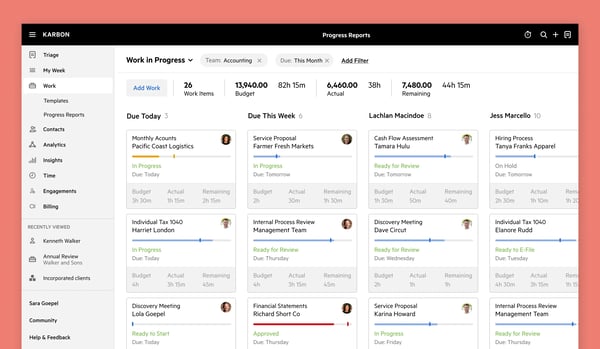
Karbon also provides built-in time and capacity tracking. Leaders can monitor billable hours, workload distribution, and engagement progress from centralized dashboards. This visibility supports better forecasting and resource planning, especially for firms managing multiple clients simultaneously.
The client portal adds operational clarity. Firms can request documents, track approvals, and give clients visibility into engagement progress inside a secure environment. With 96% of users saying they would recommend Karbon and 97% believing it is headed in the right direction, user confidence reflects how well the platform supports structured client work.
Karbon’s focused design is one of its biggest advantages. It is structured around how accounting firms actually operate rather than adapting a generic project tool to financial workflows. That specificity reduces configuration overhead and aligns terminology, templates, and task flows with real-world practice management.
According to G2 reviews, email synchronization and organization can require close attention, particularly when integrating with Outlook in deadline-driven environments. This makes it important for teams that rely heavily on email-based workflows to configure and monitor integrations carefully. For firms that centralize communication within Karbon, this structure still supports visibility and coordination across client work.
Based on user feedback, certain feature gaps in areas like engagements and billing can limit how fully some teams integrate their workflows within the platform. This is more noticeable for firms with highly specialized or end-to-end operational requirements. For accounting and professional services teams focused on workflow visibility and task management, Karbon continues to provide strong value within its core use cases.
For accounting and professional services firms that treat workflow as operational infrastructure, Karbon provides a centralized system where communication, deadlines, automation, and client management stay aligned. In compliance-driven environments, that structure becomes a competitive advantage.
What I like about Karbon:
- The way Karbon connects email, tasks, and client work in one system makes a real difference for accounting teams. Conversations don’t sit in personal inboxes. They live alongside the engagement, which keeps ownership visible and reduces the risk of something slipping through.
- I also appreciate how naturally recurring work fits into the platform. Templates for tax cycles, audits, and advisory projects bring structure to deadlines that repeat every month or quarter. Instead of rebuilding processes each time, firms can standardize and scale them confidently.
What G2 users like about Karbon:
“As a sole tax practitioner, I need an effective way to monitor the progress of my work projects. With Karbon, I create workflow templates for different project types, including individual and business tax returns and quarterly reports. These templates cover all required steps, and I can easily update progress as I go.
The ‘To Do’ feature helps me manage short-term tasks, such as contacting tax agencies or obtaining client approvals. I use Karbon daily because it simplifies my workflow. I also value its integration with Gmail, which lets me link emails directly to clients or specific work projects.”
– Karbon review, Chester R
What I dislike about Karbon:
- Because email is so deeply embedded into the system, occasional sync delays can disrupt momentum, especially in firms that depend heavily on Outlook integration. In deadline-driven environments, even small timing gaps require attention during setup.
- Certain feature gaps in areas like engagements and billing can limit how fully some firms integrate their workflows within the platform. This is more noticeable for teams with highly specialized or end-to-end operational requirements.
What G2 users dislike about Karbon:
“The initial implementation does take some time, and there’s definitely a learning curve when first setting up workflows. While the platform is powerful, it can feel overwhelming at first with so many features. Some integrations could also be a bit smoother, especially when trying to connect all of our existing systems.”
– Karbon review, Kaitlyn E.
9. Kintone: Best for no-code app building and workflow digitization
When I looked at Kintone more closely, it felt like a natural step for teams that have outgrown spreadsheets but don’t want to hire developers or simply aren’t ready to invest in full engineering support. Many organizations use it to build internal apps that mirror their exact processes — request tracking, approvals, project intake, compliance documentation, and operational dashboards. Instead of forcing teams into prebuilt structures, Kintone allows them to design their own.
Customization is its strongest differentiator. Users repeatedly highlight the ability to create tailored apps with custom fields, statuses, and workflows without writing code. Teams can shape systems around how they already operate, rather than reshaping their operations to match rigid software logic. For process-driven departments, this flexibility is practical and empowering.
Centralization is another recurring theme in user feedback. Kintone pulls scattered spreadsheets, task trackers, and manual processes into one unified platform. Teams gain clearer visibility into status, ownership, and next steps. That consolidation reduces duplication and helps leadership understand what is moving and what is stalled.
Customer support also stands out. Many users mention responsive guidance during onboarding and troubleshooting. For organizations building their first structured internal systems, that support makes a difference. It reduces friction during setup and helps teams configure workflows correctly from the beginning.
Collaboration improves once workflows are structured inside apps. Comments, status updates, and file attachments live alongside the work itself. Instead of long email threads or disconnected conversations, teams interact directly within the relevant record or process. That proximity strengthens accountability and clarity.
According to G2 reviews, the interface can feel less modern or streamlined compared to newer workflow tools, particularly when navigating complex apps or layered configurations. This can require additional steps during setup, especially as workflows become more detailed. Once teams understand how apps and records connect, day-to-day usage becomes more manageable. For teams focused on structured internal processes, the platform’s flexibility continues to support long-term usability once workflows are established.
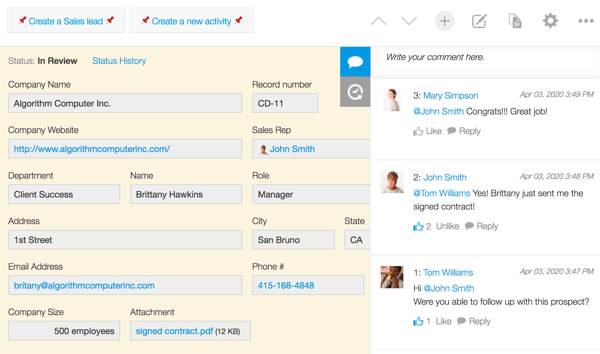
Based on user feedback, organizations with highly specific or advanced workflow requirements may need to invest additional time in configuring certain refinements or niche functionality. This is more noticeable for teams building deeply customized internal systems. For most internal workflow and app-building needs, Kintone’s flexibility remains sufficient to support structured, process-driven operations.
Kintone works best for teams that value process control over visual simplicity. For organizations ready to replace spreadsheets with structured, customizable internal systems without hiring developers, it offers the flexibility to build workflows that truly reflect how work gets done.
What I like about Kintone:
- The ability to build fully customized internal apps without code makes it easier to replace spreadsheets with structured, process-driven workflows.
- Strong customer support and centralized data visibility help teams configure workflows properly and maintain clarity across departments.
What G2 users like about Kintone:
“We no longer need to manage documents across multiple folders or locations, as everything is centralized. Kintone’s no-code flexibility allows us to easily create and customize forms and workflows to fit our business needs. Kintone also offers some of the best customer service in the industry. Their support team communicates clearly, responds quickly, and actively follows up after providing guidance to ensure issues are fully resolved. They have proven to be very reliable partners.”
– Kintone review, Verified User in International Trade and Development.
What I dislike about Kintone:
- The interface can feel less modern and occasionally less intuitive, especially when building or managing more complex apps. Teams expecting a highly streamlined, visually polished experience may notice this during configuration.
- Some users also mention that certain advanced features or refinements require workarounds or additional configuration. While Kintone offers strong customization overall, organizations with highly specialized requirements may need extra setup effort to fully align the system with their needs.
What G2 users dislike about Kintone:
“The layout of the forms could be more modernized. Everything’s kinda bulky right now. It’d be nice to allow us to customize more. I know we can use JavaScript and HTML to do that, but it’d be nice for those users who don’t know how to use that and still create a decent-looking, more modern form.”
– Kintone review, Dan P.
Best workflow management software: Side-by-side comparison
Here’s a quick glance at how these workflow management tools compare across core strengths, workflow structure, automation capabilities, and G2 ratings.
| Platform | Core strength | Workflow structure and complexity support | Ideal fit |
| Slack |
Communication-led workflows and real-time collaboration | Structured around channels and integrations; limited native dependency or portfolio management | Teams that run workflows through communication and cross-functional coordination |
| Asana | Structured task ownership and project execution clarity | Supports task dependencies, milestones, and layered projects | Marketing, product, and cross-functional teams are managing recurring and deadline-driven work |
| Smartsheet | Spreadsheet-based project and portfolio control | Supports multi-phase projects, dependencies, and portfolio roll-ups | PMOs, operations, and enterprise teams need reporting depth and precision |
| monday Work Management | Visual workflow customization and board-based planning | Supports customizable boards, dependencies, dashboards, and cross-team visibility | Mid-sized teams that prioritize visual oversight and adaptable workflows |
| ClickUp | All-in-one customizable workspace for work consolidation | Hierarchical structure with advanced dependencies and cross-project visibility | Growing teams consolidating multiple tools into one configurable platform |
| Wrike | Cross-functional project oversight and timeline visibility | Supports multi-layer projects, dependencies, Gantt timelines, workload views, and portfolio dashboards | Enterprises and operations-heavy teams managing layered, multi-team initiatives |
| Jotform Workflows | Form-driven process automation and approval routing | Supports conditional logic, multi-step approvals, and structured form-triggered processes | Teams automating intake, requests, and standardized form-based processes |
| Karbon | Workflow management tailored for accounting operations | Structured around recurring accounting workflows and client engagements | Accounting firms and professional services managing compliance-driven workflows |
| Kintone | Custom app creation and workflow system building | Supports fully customizable apps, role-based permissions, multi-step approvals, and cross-process workflows | Organizations building custom internal systems without engineering support |
Frequently asked questions about workflow management software
Have more questions? Find answers below!
Q1. What is the top-rated workflow management solution for enterprises?
Smartsheet, Asana (Enterprise), and ClickUp (Enterprise) are commonly adopted by large organizations that require scalability, governance controls, and portfolio-level oversight. These platforms support advanced reporting, security features like SSO, and cross-department workflow visibility that enterprise teams depend on.
Q2. What is the most affordable workflow management software for SMBs?
Asana and ClickUp offer some of the most accessible entry points for small and mid-sized businesses, with generous free plans and scalable pricing. Monday Work Management also provides lower-tier paid plans that balance automation, visibility, and usability without enterprise-level costs.
Q3. What is the top platform for designing complex business workflows?
Smartsheet and ClickUp are widely used for designing complex workflows because they support dependency mapping, layered automation, and structured reporting across multiple projects and teams.
Q4. Which workflow management software offers the best automation capabilities?
ClickUp and Monday Work Management provide strong rule-based automation and AI-assisted workflow features. Smartsheet supports multi-step conditional approvals, while Slack offers lighter automation focused on coordination and routing.
Q5. Which vendor offers AI-powered workflow optimization?
Slack, ClickUp, Monday Work Management, and Asana all include AI capabilities. Slack provides conversation summaries and recaps, ClickUp includes ClickUp Brain for task assistance, and Monday Work Management and Asana offer AI-powered workflow insights and automation support.
Q6. What platform provides analytics on workflow efficiency and bottlenecks?
Asana, Smartsheet, Monday Work Management, and ClickUp provide dashboards that highlight workload distribution, milestone progress, and performance trends. Enterprise plans typically expand this visibility with portfolio-level analytics.
Q6. What platform provides analytics on workflow efficiency and bottlenecks?
Asana, Smartsheet, monday Work Management, and ClickUp provide dashboards that highlight workload distribution, milestone progress, and performance trends. Enterprise plans typically expand this visibility with portfolio-level analytics.
Q7. Which solution supports multi-step approval processes?
Smartsheet, ClickUp, and Monday Work Management support structured multi-step approval workflows through rule-based automation and conditional triggers. Slack can route approvals through Workflow Builder but is usually used as a coordination layer.
Q8. What platform integrates workflow management with CRM and ERP systems?
Slack, ClickUp, and Asana offer extensive integration ecosystems that connect with CRM and ERP platforms like Salesforce and Microsoft systems. Smartsheet and monday Work Management also support enterprise integrations through native connectors and APIs.
Q9. Which tool supports integration with cloud-based productivity tools?
Slack, ClickUp, Asana, Monday Work Management, and Smartsheet all integrate with cloud productivity suites such as Google Workspace and Microsoft 365 through native integrations and APIs.
Q10. Which vendor provides real-time workflow tracking and monitoring?
Asana, Monday Work Management, Smartsheet, and ClickUp provide real-time dashboards and task updates that help teams track workflow progress. Slack surfaces real-time activity through channel notifications and integrations.
Making work… work
When I evaluate workflow management software, something in the process is already breaking. Handoffs stall. Ownership gets blurred. Status updates take more effort than execution. That friction is what pushes teams to look for better workflow management software.
As I reviewed these platforms, I focused on how each one supports execution. Slack centralizes communication and surfaces updates across tools. Asana brings structure and ownership to task execution. Smartsheet supports reporting-heavy environments with portfolio-level visibility. monday Work Management enables flexible, visual workflows. ClickUp and Wrike support layered, cross-functional coordination with deeper configuration. Jotform Workflows, Karbon, and Kintone focus on structured automation within specific operational contexts.
The decision comes down to how your team operates. Some teams rely on communication flow. Others depend on structured sequencing and reporting precision. When the platform aligns with that operating model, adoption stays consistent and workflows move without friction.
G2 Data shows higher satisfaction when teams choose tools that match their workflow patterns. Across reviews, the same trend holds. Software performs best when it reinforces existing discipline and improves execution clarity. Workflow software reflects process maturity. The right system makes ownership visible, reduces coordination overhead, and supports scale as complexity increases.
If you’re choosing between tools, focus on alignment. Select the platform that supports how your team executes today and can support how it grows.
If you’re exploring ways to automate processes beyond task coordination, it may also help to compare the best business process automation software to see how teams scale structured processes across departments.
